moment - Photo Time Stamp Cam

moment - Photo Time Stamp Cam Summary
moment - Photo Time Stamp Cam is a free iOS app in Photo And Video by Changhun Lee. Released in Oct 2019 (7 years ago). It has 26 ratings with a 4.85★ (excellent) average. Based on AppGoblin estimates, it reaches roughly 36 monthly active users . Store last updated Sep 8, 2026
moment - Photo Time Stamp Cam SDKs Summary
App not yet scanned for SDKs.
4.85★
Ratings: 26
Screenshots

App Description
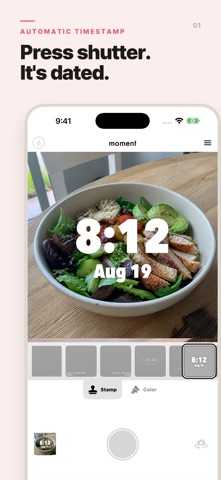
Add a clear photo time or photo date stamp to every picture.
Document workouts, meals, travel, study sessions, and daily progress with moment.
Choose a ready-made stamp style and color, then save or share your photo.
ADD TIME AND DATE TO EVERY PHOTO
moment is a timestamp camera for creating clear, consistent photo records. Take a new picture and add the current date and time automatically, or choose an existing photo and stamp the date it was taken when that information is available.
Use moment whenever the date and time are part of the story:
• Workout progress and fitness check-ins
• Meals, food diaries, and nutrition records
• Weight measurements and body-progress logs
• Study sessions and morning routines
• Work, attendance, and project records
• Travel, family memories, and everyday photo journals
• Daily habits, challenges, and before-and-after progress
WHY YOU'LL LOVE MOMENT
• Add a photo time and date stamp in seconds
• Shoot in 1:1 or 4:3, in portrait or landscape
• Create easy-to-understand records without writing separate notes
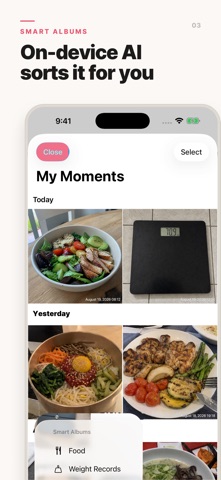
• Keep timestamped photos together in the built-in moment gallery
• Find food and weight records faster with Smart Albums
• Correct an AI result by removing a tag directly from a photo
• Save stamped photos to your photo library and share them with other apps
STAMP STYLES FOR YOUR RECORDS
Choose from a range of timestamp styles designed for different photos. Available styles combine different fonts, sizes, date and time arrangements, and stamp positions. Select a color that stays readable on your image, preview the result, and switch between 12-hour and 24-hour time.
Whether you prefer a compact corner timestamp, a bold centered time, or a layout that includes the weekday, moment makes it easy to give each record a clear and consistent look.
CHOOSE YOUR FRAME
Switch between a square 1:1 frame and a classic 4:3 frame with one tap. Hold your phone upright or sideways: the stamp follows the way you hold it, so landscape shots come out level with the timestamp in the right place. Photos from your library are cropped to the same ratio, keeping your records consistent.
WORKS WITH EXISTING PHOTOS
Your photo does not have to be taken inside moment. Select a picture from your photo library, crop it, preview the timestamp, and apply a style before saving. When the photo's capture date is avail