Pitch Checker: Chromatic Tuner

Pitch Checker: Chromatic Tuner Summary
Pitch Checker: Chromatic Tuner is a ad-supported, with in-app purchases iOS app in Music And Audio by Shigeki Matsunaka. Released in Dec 2019 (6 years ago). It has 1K ratings with a 4.66★ (excellent) average. Based on AppGoblin estimates, it reaches roughly 3.8K monthly active users and generates around $<10K monthly revenue (40% IAP / 60% ads). Store metadata: updated May 8, 2026, version 54.
Recent activity: 6.00 new ratings this week View trends →
Data tracking: SDKs and third-party integrations were last analyzed on May 26, 2026.
Store info: Last updated on App Store on May 8, 2026 (version 54).
SDKs, Trackers & Permissions
Pitch Checker: Chromatic Tuner was last scanned for SDKs 2026-05-26. Below is the overview of third party companies detected in the app. The full list of raw SDKs, app permissions and unknown SDKs is available here.
AppGoblin saw Pitch Checker: Chromatic Tuner uses 4 Ad Networks
 Unity
Unity AdMob
AdMob Google
 Vungle
AppGoblin saw Pitch Checker: Chromatic Tuner uses 2 Development Tools
 nanopb
AppGoblin saw Pitch Checker: Chromatic Tuner uses 1 Business Tools
 RevenueCat
AppGoblin saw Pitch Checker: Chromatic Tuner uses 1 Analytics: Product
 Firebase
App Details
App Store
Ads & App-Ads.txt
AppGoblin SDK Scans
4.66★
Ratings: 1K
Screenshots

App Description
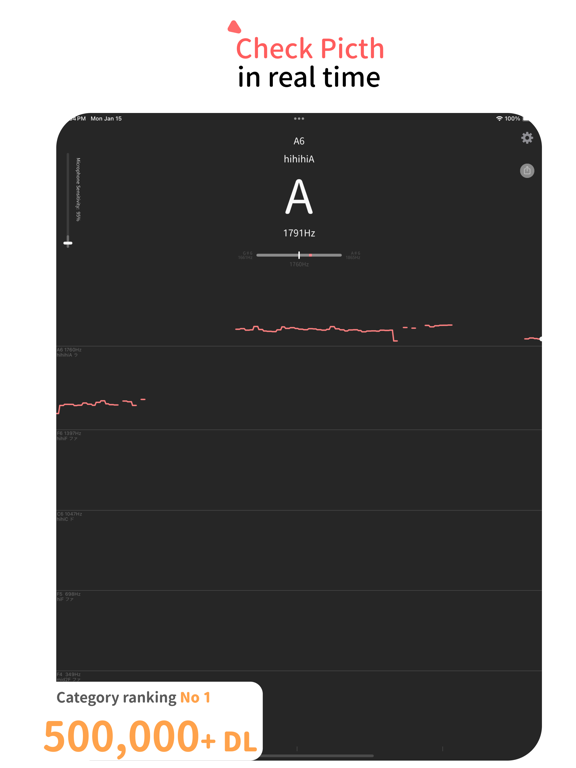
The app analyzes real-time audio from your microphone and displays musical note, pitch, octave, frequency, and waveform information.
It also includes a Metronome feature (Beta), allowing you to set the tempo and practice with sound and vibration cues.
■ Usage Examples
- Measure vocal range
- Practice absolute pitch
- Detect the musical notes of a song (pitch detection)
- Vocal exercises
- Karaoke practice
- Improve pitch accuracy
- Measure frequency
- Voice training
- Basic instrument tuning (use it as a tuner)
- Do, Re, Mi note detection
- Rhythm practice using the metronome
You can pause the analysis with a tap, allowing you to review the results at your own pace. The display also supports notations such as low A, mid2 A, hihi A, etc.
■ How to Use
Simply launch the app, and it will automatically measure the pitch of sounds captured by the microphone — whether voice or instruments. To avoid picking up small sounds and background noise, slide the “Microphone Sensitivity” bar in the upper-left corner upward.
The metronome can be used by simply setting your desired tempo.
■ Settings
Tap the gear icon in the top-right corner to access the following settings:
- Toggle between sharp and flat notation
- Change the large center display notation (Do, Re, Mi / C, D, E, F, G, A, B)
- Set the reference pitch
- Adjust pitch detection speed
- Set the metronome tempo
■ FAQ
Q. I want to measure my vocal range.
A. The app displays extended ranges such as hihi A and lowlow A for your reference.
Q. Pitch is displayed even when it’s quiet.
A. Even in very quiet environments, tiny background noise may be detected.
To prevent this, slide the “Microphone Sensitivity” bar upward to ignore softer sounds.
Q. I want to use it as a tuner.
A. No special settings are required. However, switching the large center display from "Do, Re, Mi" to "C, D, E, F, G, A, B" may be more convenient.
Tap the gear icon and change the “Large Display Notation” setting.
■ Other Information
Permissions:
- Microphone: Used to analyze audio input
- Siri & Search, Cellular Data: Used for AdMob advertisements
Terms of use can be found here:
https://shigeki.work/pitchchecker/termsofuse
For bug reports or inquiries about the app, contact via the app's settings (bug report or inquiry) or email support (replace the at symbol with @): support at shigeki.work.
Feel free to use