Falcon Mx - DICOM Viewer

Falcon Mx - DICOM Viewer Summary
Falcon Mx - DICOM Viewer is a free, with in-app purchases iOS app in Medical by iCat Solutions Ltd. Released in Feb 2020 (6 years ago). It has 2.4K ratings with a 4.60★ (excellent) average. Based on AppGoblin estimates, it reaches roughly 6.7K monthly active users and generates around $<10K monthly revenue (100% IAP / 0% ads). Store last updated Sep 15, 2026
Recent activity: 1.00 new ratings this week View trends →
SDK intelligence: AppGoblin detected 2 development tools(e.g. Google), 1 ad networks,and 1 analytics: product integrated into Falcon Mx - DICOM Viewer. View full SDK list →
Falcon Mx - DICOM Viewer SDKs Summary
Falcon Mx - DICOM Viewer was last scanned for SDKs on 2026-07-05. Below is the overview of third-party companies detected in the app. The full list of SDKs, permissions and unknowns is available here.
 Google
 nanopb
 Firebase
4.6★
Ratings: 2.4K
Screenshots




App Description
Falcon Mx™ – DICOM Viewer for iPhone and iPad
Falcon Mx is a powerful DICOM viewer for iPhone and iPad designed to view, manage, and share medical imaging studies wherever you are. Open and review DICOM images from virtually all imaging modalities, including CT, MRI, X-ray, Ultrasound (US) and more.
Whether you’re reviewing studies, organizing your personal medical imaging library, or securely sharing exams with colleagues or patients, Falcon Mx provides a fast, intuitive experience built specifically for Apple devices.
- - - - - - - - - - - - - - -
- - - Key Features - - -
- - - - - - - - - - - - - - -
Image Navigation & Viewing Tools
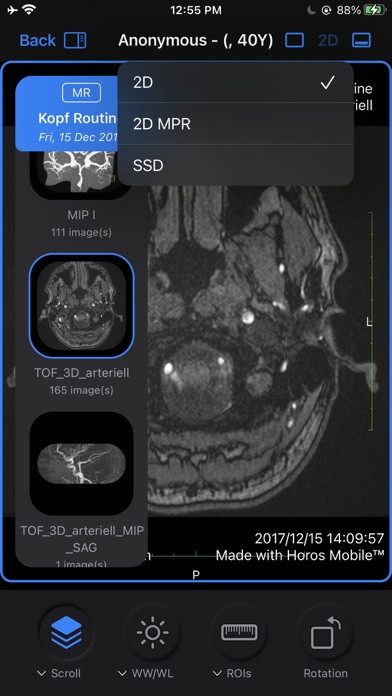
• Window Width / Window Level (WW/WL)
• WW/WL presets
• Adjustable scrolling speed
• Zoom
• Pan
• Rotate
• On-screen navigation controls
• Cine Mode
• Image looping
• Sort by Instance or Slice Location
DICOM & PACS Connectivity
• Support for custom DICOM Nodes (DICOM Protocol)
• Import studies quickly and securely from your PACS
• Send and retrieve DICOM studies between devices using DICOM Protocol or Bonjour
• Import studies from iCloud Drive, Dropbox, and Google Drive
Advanced DICOM Viewing
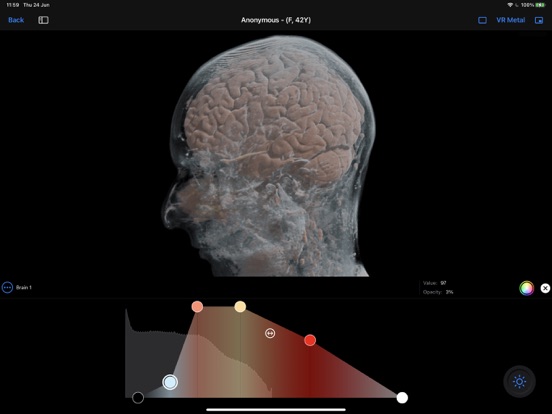
• Photorealistic 3D Volume Rendering
• 3D Multiplanar Reconstruction (MPR)
• Orthogonal (2D) MPR
• MIP, MinIP, and Mean rendering modes
• 3D SSD Rendering
• Multiple windows (Split Screen)
• Synchronized multi-window viewing
• No resolution restrictions on imported images
Measurements & ROI Tools
• Distance measurement
• Angle measurement
• Point ROI (pixel values)
• Area ROI (minimum, maximum, standard deviation, area)
• Closed Path ROI
• Curved Line ROI
• Freehand (Scribble) ROI
• Text ROI
• Arrow ROI
• Cardio-Thoracic Ratio (CTR)
Study Management
• Patient Folders
• Study anonymization
• Export anonymized studies
• View and edit DICOM metadata
• Support for numerous DICOM image formats, including JPEG and JPEG2000 (see DICOM Conformance Statement)
Falcon Cloud™
• Cloud-based storage, synchronization, and secure sharing of DICOM studies across the Falcon ecosystem.
Falcon Link™
• Your personal space for patients to securely share DICOM studies with you. Works seamlessly with Falcon Mx.
Languages
Available in:
* English
* German
* French
* Ukrainian
* Greek
* Hungarian
* Polish
* Russian
No resolution restrictions in imported