Photo to Watercolor Waterbrush

Photo to Watercolor Waterbrush Summary
Photo to Watercolor Waterbrush is a free, with in-app purchases iOS app in Photo And Video by Digital Masterpieces GmbH. Released in Dec 2020 (5 years ago). It has 5.9K ratings with a 4.83★ (excellent) average. Based on AppGoblin estimates, it reaches roughly 3.3K monthly active users and generates around $<10K monthly revenue (100% IAP / 0% ads). Store last updated Sep 22, 2026
Recent activity: 7.00 new ratings this week View trends →
Photo to Watercolor Waterbrush SDKs Summary
App not yet scanned for SDKs.
4.83★
Ratings: 5.9K
Screenshots




App Description
Turn your photos and videos into luminous, vivid watercolor paintings — art so beautiful, it belongs in a gallery.
Waterbrush transforms your images into stunning watercolor artwork — right on your iPhone, iPad, or Mac. Whether you're capturing a travel memory, a family portrait, or an everyday moment, Waterbrush brings the soft glow and delicate flow of traditional watercolors to your fingertips. Your images stay 100% private. Everything is processed directly on your device for instant results and complete peace of mind. No internet required.
◆ Photos and Videos — Both Transformed
Export up to 4K resolution at 60 FPS for stunning video productions, or go for an artistic stop-motion look. For photos, export up to 64 megapixels — perfect for large-format prints, canvas art, journal covers, or even T-shirt designs.
◆ 31 Curated Watercolor Styles
Every style captures the essence of traditional watercolor painting. Find the perfect look for portraits, landscapes, travel photos, or daily snapshots — then make it your own. With Custom Styles, personalize and save your own presets — synced across all your devices.
◆ Precise Editing Tools
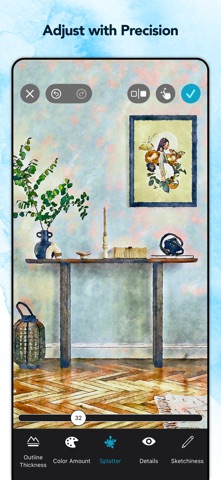
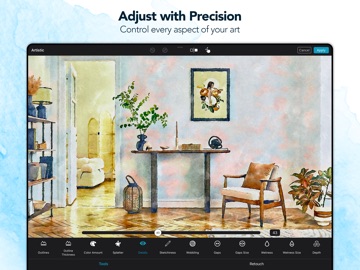
Take full control of your artwork. Fine-tune every detail with pixel-level accuracy — using your finger or Apple Pencil — directly in real time. Adjust wetness, wobbling, splatter, outlines, and more. Remove imperfections with the Magic Eraser, or add your personal signature to mark your creations as truly yours.
◆ Projects — Your Creative Work, Always Saved
Never lose a creative idea in progress. Save your edits as a project and return at any time — right where you left off. Explore variations, experiment freely, and share your projects with others.
◆ Paper, Color & Finish
Complete your artwork with authentic finishing touches:
• 22 fine-art paper textures for a realistic, tactile feel
• 44 color palettes to set the perfect mood
• 30 customizable vignettes to frame your art
Every detail contributes to a finished piece that looks and feels like traditional watercolor art.
◆ Print & Share Your Creations
Bring your watercolors into the real world:
• Postcards via MyPostcard — worldwide delivery
• Canvas prints and posters via CanvasPop with a 100% "Love It" guarantee
• Large-format prints, made possible by Waterbrush's ultra-high-resolution output
Share your finished pieces on Inst