MinimalLauncher

MinimalLauncher Summary
MinimalLauncher is a ad-supported, with in-app purchases iOS app in Tools by Akihiro Usui. Released in Mar 2020 (6 years ago). It has 2.00 ratings with a 2.50★ (poor) average. Based on AppGoblin estimates, it reaches roughly 6.00 monthly active users and generates around $<10K monthly revenue (22% IAP / 78% ads). Store metadata: updated Apr 30, 2026.
Store info: Last updated on App Store on Apr 30, 2026 .
2.5★
Ratings: 2.00
Screenshots


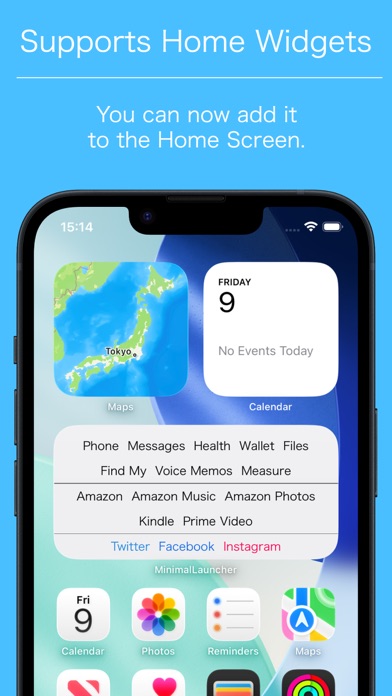
App Description
MinimalLauncher is a minimal launcher app that displays only app names.
There are many launcher apps available on the App Store, and most of them launch apps by tapping displayed icons.
With those launcher apps, when you register many apps, the screen quickly becomes filled with icons, and in some cases you need to scroll in order to launch apps located at the bottom.
Although the purpose of using a launcher app is to quickly launch apps, I personally found it bothersome that scrolling adds an extra step.
With this in mind, I thought it would be nice to have a launcher app that can display a large number of apps on one screen by listing only app names, and so I created MinimalLauncher.
The number varies depending on the device's screen size and the font size and spacing settings for app names, but it is possible to display around 100 apps on one screen.
*Please note that before removing the limitation via an in-app purchase, the number of apps that can be registered is limited to 10.
After checking the usability, you can make an in-app purchase to remove the limitation and register apps without restriction.
*Please note that this app does not have a feature that automatically sets a URL scheme when you select an app.
By using Apple's official "Shortcuts" app, you can launch apps that do not have a URL scheme or whose URL scheme is unknown.
For details, please refer to the following URL:
https://broad-connect.net/2020/03/01/minimallaunchershortcut/
◆Main Features
・A set of three launchers-MainLauncher, LeftLauncher, and RightLauncher-that can be switched instantly by swiping left or right.
・Freely set the color of each app name (separate colors can be set for Light Mode and Dark Mode)
・Insert line breaks or separators at arbitrary positions
・Display clipboard contents (enter "_CLIP_" as the app name)
・Set URLs using clipboard contents (enter "_ENCCLIP_" in the URL; for example, if you set the URL to "http://www.google.com/search?q=_ENCCLIP_", you can search Google using the clipboard contents)
・Change app icons
・Home widget support (there are limitations described below; please note that these apply)
・URL scheme support
Launch: minimallauncher://
Add app: minimallauncher://add/?name=[Name]&url=[URL]
*Please note that when using "_CLIP_" or "_ENCCLIP_", on iOS 16 and later, an alert related to pasting is displayed every