QuickScan:PDF OCR Text Scanner

QuickScan:PDF OCR Text Scanner Summary
QuickScan:PDF OCR Text Scanner is a free, with in-app purchases iOS app in Productivity by iSolid apps. Released in May 2020 (6 years ago). It has 31K ratings with a 4.87★ (excellent) average. Based on AppGoblin estimates, it reaches roughly 78K monthly active users and generates around $<10K monthly revenue (100% IAP / 0% ads). Store last updated Oct 7, 2026
Recent activity: 12 new ratings this week View trends →
SDK intelligence: AppGoblin detected 1 development tools(e.g. Google),and 1 ad networks integrated into QuickScan:PDF OCR Text Scanner. View full SDK list →
QuickScan:PDF OCR Text Scanner SDKs Summary
QuickScan:PDF OCR Text Scanner was last scanned for SDKs on 2026-07-19. Below is the overview of third-party companies detected in the app. The full list of SDKs, permissions and unknowns is available here.
 Google
 Snap
Snap4.87★
Ratings: 31K
Screenshots


App Description
The app is 100% FREE, with NO ads and NO data collection. Donations are possible to support the project.
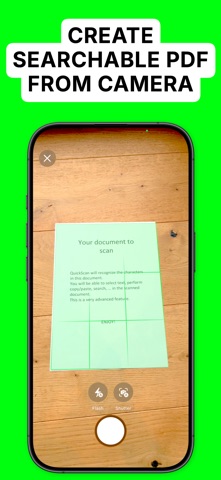
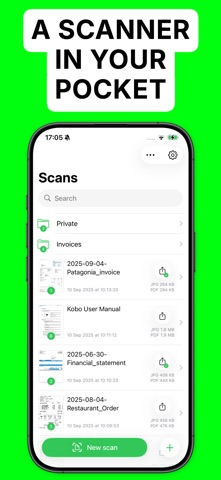
QuickScan is the easiest & quickest yet super-powerful scanner on iOS.
Main features:
### iOS integration ###
• QuickScan has been designed specifically for iOS & iPadOS for seamless integration and an exceptional user experience.
### Scan & import ###
• Scan with your camera (automatic document detection & automatic angle correction)
• Import existing images
• Import existing PDF files
• Organize your documents in folders
### OCR (text recognition) ###
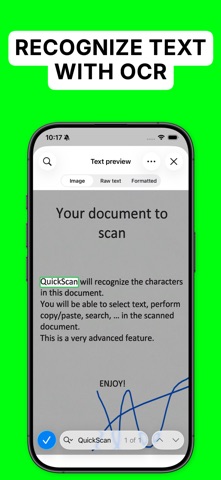
• Professional-quality OCR on images and existing PDFs
• Make documents searchable with text integrated into PDFs (search, select, copy, paste)
• Automatic language detection and dictionary matching for highly accurate results
### SIGN ###
• Add signatures to your documents
• Create signatures with your finger, Apple Pencil, or import existing signatures
• Adjust size and color for a polished look
### Automate ###
• Automatic document/file naming with patterns (e.g., document date, title, issuer, time, text, counter)
• 'Export Favorites': Automatically export to preconfigured locations (cloud, email, etc.) with custom settings (color, black & white, filename, format)
• 'Export Groups': Export to multiple locations simultaneously by grouping Export Favorites
• Automatic deletion of documents after successful export
• iOS Home screen & Lock screen Widgets & Control Center controls. Associate an Export Favorite to the widget for instant export to that favorite after the scan started by tapping the widget.
• Place document automatically in the configured folder when the scan is started from a Widget/Shortcut associated to an Export Favorite
• Siri Shortcuts compatible
• Launch scan directly from the home screen with a long press on the app icon (or using a widget)
### Export ###
• Export in PDF with the recognized text integrated (very advanced feature). This allows to search/copy & paste into the generated PDF.
• Export recognized text as a .txt file
• Export as images with optional filters (grayscale, black & white)
• Save to cloud services with Favorites (iCloud Drive, Dropbox, Google Drive, OneDrive, SharePoint, WebDAV, paperless-ngx, pCloud, NAS, SMB, NextCloud, and more)
• Export anywhere (to Files, to any Drive, E-mail, message, Airdrop, …), or to