CashflowPlan

CashflowPlan Summary
CashflowPlan is a with in-app purchases iOS app in Finance by iStArtApp. Released in Jul 2020 (5 years ago). It has 1.00 ratings with a 1.00★ (poor) average. Based on AppGoblin estimates, it reaches roughly 6.00 monthly active users and generates around $<10K monthly revenue (100% IAP / 0% ads). Store metadata: updated Jan 20, 2023.
Store info: Last updated on App Store on Jan 20, 2023 .
1★
Ratings: 1.00
Screenshots


App Description
+ What is CashflowPlan
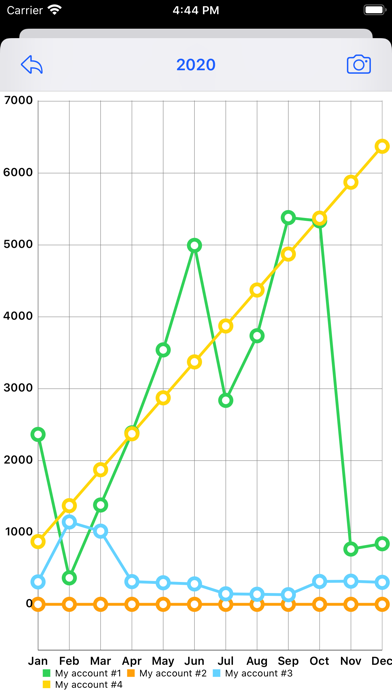
CashflowPlan archives your financial transactions to create and edit a sources-costs budget with detailed views and charts.
Simple yet powerful: CashflowPlan helps you to manage your future Cash Flow in a meaningful way. Treat yourself to a greater peace of mind and instead of back-tracking your finances, take a deep look into your future.
+ CashflowPlan is universal
You can use CashflowPlan on your iPhone, iPad and Mac. With your Apple Id CashflowPlan syncs your budgets on all your devices.
+ CashflowPlan first setup
Just out of the startup welcome slides, name your accounts for setup: up to four. You can choose name, color and order.
Press the button with three stripes (Menu button) which has various choices including 'Settings', the icon with the gears, where you find:
- Accounts: for names and order
- Accounts color
- Assets and Snapshots: assets and accounts added together to create a list of Snapshots at user-defined dates
- Years Archive: archive management menu to save and load whole years
+ Build your first budget
CashflowPlan has two main views:
- Year view
- Month view
CashflowPlan, just downloaded, presents the current year at zero, with all months each containing just one pre-set transaction with the initial balance at zero.
Select the view of the month you are currently in: you can start adding transactions to the accounts that interest you there.
For each transaction you have a description and a date for which you enter movements on the accounts such as uses/costs (-) or sources/revenues (+): transactions already executed can be marked as 'Done'. Foreseen transactions will be left unmarked. By doing so, in the month view, you will have an eye on what has already happened and what you foresee that will happen and when, in the near future.
For the first transaction, for example, enter the description 'Initial balance' and the balance on that date of your accounts. By continuing to enter transactions, in each month, you will build your sources-costs budget.
+ Selection of visible accounts
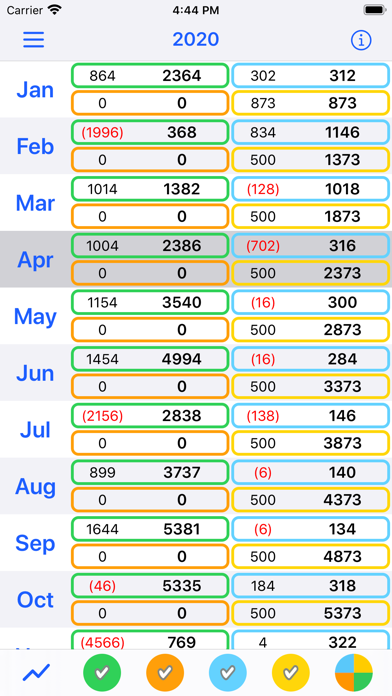
In the year view you find five buttons with colored icons: the first four for each account. If they are marked the account is visible, hidden otherwise. The fifth icon allows you to choose the view, for all visible accounts:
- separate, or
- summary, cumulative.
Just a single tap or click.
+ More details for editing transactions