Instdown for Videos & Stories

Instdown for Videos & Stories Summary
Instdown for Videos & Stories is a free, ad-supported, with in-app purchases iOS app in Social Networking by Phuc Nguyen. Released in Jul 2020 (6 years ago). It has 65K ratings with a 4.68★ (excellent) average. Based on AppGoblin estimates, it reaches roughly 208K monthly active users and generates around $10K+ monthly revenue (30% IAP / 70% ads). Store last updated Jul 23, 2026
Recent activity: 2.00 new ratings this week View trends →
SDK intelligence: AppGoblin detected 5 development tools(e.g. Google), 2 ad networks,and 1 analytics: product integrated into Instdown for Videos & Stories. View full SDK list →
Instdown for Videos & Stories SDKs Summary
Instdown for Videos & Stories was last scanned for SDKs on 2026-09-24. Below is the overview of third-party companies detected in the app. The full list of SDKs, permissions and unknowns is available here.
 Google
 AdMob
AdMob nanopb
 Alamofire
 MongoDB
 Firebase
4.68★
Ratings: 65K
Screenshots


App Description
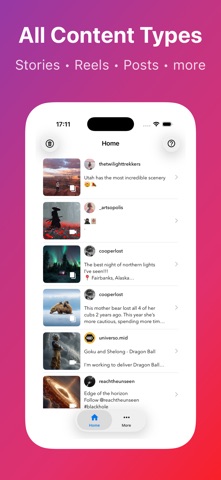
The easiest way to repost videos from Instagram, TikTok, Twitter, Facebook and more.
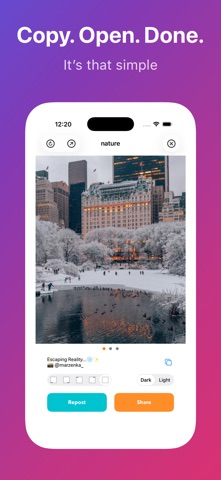
Share your favorite content with one tap. Instdown makes reposting simple — just copy a link and open the app.
WHAT YOU CAN REPOST:
- Instagram: Stories, Reels, Posts, Photos, Highlights
- TikTok: Videos with or without watermark
- Twitter/X: Videos, Photos, GIFs
- Facebook: Videos, Photos, Reels
- and more.
WHY INSTDOWN:
▸ Multi-platform support — One app for all social networks
▸ HD Quality — Original resolution preserved
▸ No login required — 100% private
▸ Lightning fast — Repost in seconds
HOW IT WORKS:
1. Copy the link from any supported app
2. Open Instdown — auto-detects the link
3. Tap Repost and share!
Disclaimer: This app is not sponsored, endorsed by or affiliated with Instagram, TikTok, Twitter, Facebook or any other social networks.
---------
Auto Renewable Subscription Terms:
* Your free trial subscription will automatically renew to a paid subscription unless auto-renew is turned off at least 24 hours before the end of the free trial period.
* Please note: any unused portion of a free trial period (if offered) will be forfeited when you purchase a premium subscription during the free trial period.
* You can cancel a free trial or subscription anytime by turning off auto-renewal through your iTunes account settings. This must be done 24 hours before the end of a free trial or subscription period to avoid being charged. The cancellation will take effect the day after the last day of the current subscription period, and you will be downgraded to the free service.
Terms of Use:
https://hashtags-26d49.web.app/terms.html
Privacy Policy:
https://hashtags-26d49.web.app/privacy.html