Smart Head Track for OpenTrack

Smart Head Track for OpenTrack Summary
Smart Head Track for OpenTrack is a free, with in-app purchases iOS app in Games by TINAC Inc.. Released in Sep 2020 (5 years ago). It has 179 ratings with a 3.86★ (average) average. Based on AppGoblin estimates, it reaches roughly 201 monthly active users and generates around $<10K monthly revenue (100% IAP / 0% ads). Store last updated Apr 2, 2026
SDK intelligence: AppGoblin detected 2 development tools(e.g. nanopb), 1 analytics: product,and 1 ad networks integrated into Smart Head Track for OpenTrack. View full SDK list →
Smart Head Track for OpenTrack SDKs Summary
Smart Head Track for OpenTrack was last scanned for SDKs on 2026-07-10. Below is the overview of third-party companies detected in the app. The full list of SDKs, permissions and unknowns is available here.
 Firebase
 Google
 nanopb
3.86★
Ratings: 179
Screenshots



App Description
Smart Head Track — Head Tracking for PC Games, No Hardware Needed
Turn your iPhone or iPad into a head tracker. Move your head to control your in-game camera in flight sims, racing games, truck simulators, and more — replacing expensive hardware like TrackIR with your phone's front camera and ARKit.
WORKS WITH YOUR FAVORITE GAMES
Compatible with any PC game supporting FreeTrack or TrackIR protocol:
• Microsoft Flight Simulator
• Digital Combat Simulator (DCS)
• Euro Truck Simulator 2 / American Truck Simulator
• IL-2 Sturmovik
• Star Citizen
• Assetto Corsa
• …and hundreds more
EASY SETUP
Connect to OpenTrack (free, open-source) on your PC via WiFi or USB. Enter your PC's IP address, tap Calibrate, and start tracking in under a minute.
On Your PC:
1. Download and install OpenTrack: https://git.io/JUs2U
2. Set Input to "UDP over network"
3. Set Output to "freetrack 2.0 Enhanced"
4. Ensure port 4242 is open on your firewall
On Your Phone:
1. Launch Smart Head Track and enter your PC's IP address
2. Align your face and tap Calibrate
3. Press Start on both the app and OpenTrack
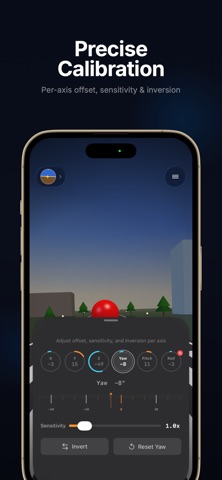
PRECISE CALIBRATION
Adjust each of the 6 axes (X, Y, Z, Yaw, Pitch, Roll) independently. Per-axis sensitivity, inversion, and offset controls let you dial in exactly the feel you want.
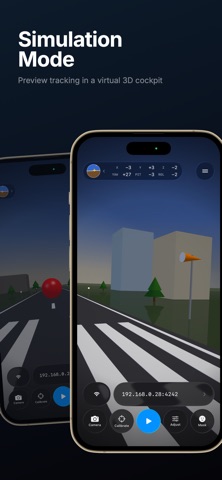
SIMULATION MODE
Preview your tracking in a virtual 3D cockpit before connecting to your PC — perfect for testing your calibration settings.
BUILT FOR LONG SESSIONS
• Power Save — Dim the camera view, hide overlays, or switch to minimal UI while tracking continues
• Connection Monitor — Get notified if the link to OpenTrack drops so you can troubleshoot quickly
AR FACE OVERLAYS
Pilot helmets, sunglasses, combat gear, and more — add fun overlays to your camera feed while tracking.
FREE & PRO
The core tracking experience is free with a daily time limit. Unlock unlimited tracking and all face overlays with a one-time Pro purchase.
CONNECTIVITY
• WiFi: UDP over your local network (default port 4242)
• USB: Direct cable connection via companion desktop app
• iPad: Full landscape orientation support
Privacy Policy: https://www.tinacinc.com/SmartHeadTrack/privacy_policy.html