MarginNote 4: AI Notes·MindMap

MarginNote 4: AI Notes·MindMap Summary
MarginNote 4: AI Notes·MindMap is a free, with in-app purchases iOS app in Productivity by Beijing Yunsi Software Technology Co., Ltd. Released in May 2024 (2 years ago). It has 22K ratings with a 4.61★ (excellent) average. Based on AppGoblin estimates, it reaches roughly 50K monthly active users and generates around $<10K monthly revenue (100% IAP / 0% ads). Store last updated Aug 23, 2026
Recent activity: 61 new ratings this week View trends →
SDK intelligence: AppGoblin detected 4 development tools(e.g. Google), 2 ad networks,and 2 analytics: product integrated into MarginNote 4: AI Notes·MindMap. View full SDK list →
MarginNote 4: AI Notes·MindMap SDKs Summary
MarginNote 4: AI Notes·MindMap was last scanned for SDKs on 2026-06-13. Below is the overview of third-party companies detected in the app. The full list of SDKs, permissions and unknowns is available here.
 Google
 nanopb
 Alamofire
 Swinject
 Facebook
 Snap
Snap Firebase
 Mixpanel
4.61★
Ratings: 22K
Screenshots



App Description
MarginNote is the PDF study tool for deep readers. One excerpt is a PDF highlight, a mind map node, and a flashcard — one capture, three places. This is the Card Axis architecture, so you stop ferrying content between a PDF reader, a notes app, and a flashcard tool. A decade of iteration. 188K+ App Store ratings.
【Four Featured Mechanics】
▸ Card Axis — One excerpt, three renders. Document highlight, mind map node, and flashcard are the same card seen from three angles.
▸ Title Link — Old notes auto-surface in new documents. When a familiar concept appears in what you're reading, your past annotation lights up on the page.
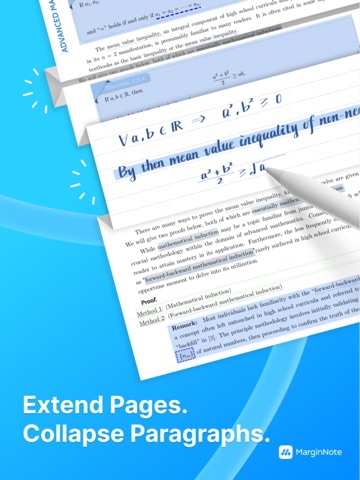
▸ Extended Note — Long-press anywhere on a PDF to open writing space. No anchored text required; three display modes (inline / margin / collapsed).
▸ Immersive Mode (4.4) — Three-state toggle: Read / Write / Recall. UI folds away. Recall blurs excerpts with Gaussian blur — tap to reveal only after you've actually recalled.
【AI Capabilities (introduced in 4.2)】
AI book breakdown · AI OCR templates · AI translation · AI Q&A · AI flashcard generation
Our stance is AI as assistant, not replacement — every suggestion can be saved as your own thinking node, never thinking for you.
【Apple Intelligence (iOS 26+)】
Recall Mode hints can run on-device via Apple Intelligence — pick "Apple AI" or "cloud LLM" in Settings. With Apple AI selected, three tiers of help — Neighbor Coordinate · Reasoning Prompt · Key Distinction — are generated by Apple Foundation Models right on your device: no network calls, no AI credits used, your notes never leave your device. Even if you've selected cloud LLM, going offline auto-falls back to Apple Intelligence (provided your device supports it) — so libraries, planes, and exam-day silent rooms never break your hint loop.
【Full Workflow】
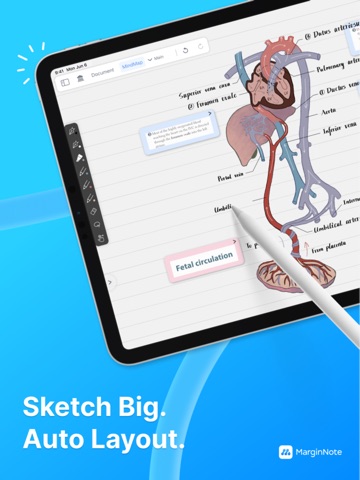
Fast OCR · Study Sets (PDF / EPUB / video / audio) · direct read from Zotero / cloud drives / USB · 10 mind map styles · book recomposition · dual-document compare · concept maps · handwriting layers
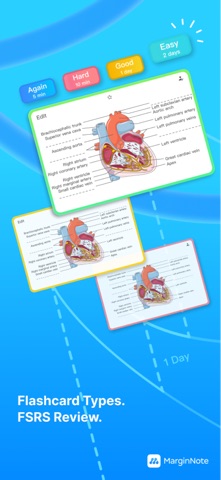
【FSRS Spaced Repetition】
Built on the open-spaced-repetition project's algorithm (paper accepted by ACM SIGKDD; Anki has used FSRS as its default scheduler since v23.10). Push short-term memory into long-term.
【Built For】
Anyone re-reading a single document until it sticks — med school (USMLE / MCAT) · law scho