VoCat - My Own Vocabulary

VoCat - My Own Vocabulary Summary
VoCat - My Own Vocabulary is a free, ad-supported, with in-app purchases iOS app in Education by DevStory Corp.. Released in Nov 2020 (5 years ago). It has 5.9K ratings with a 4.87★ (excellent) average. Based on AppGoblin estimates, it reaches roughly 8.5K monthly active users and generates around $<10K monthly revenue (35% IAP / 65% ads). Store last updated Jul 13, 2026
SDK intelligence: AppGoblin detected 5 development tools(e.g. SDWebImage), 2 ad networks,and 1 analytics: product integrated into VoCat - My Own Vocabulary. View full SDK list →
VoCat - My Own Vocabulary SDKs Summary
VoCat - My Own Vocabulary was last scanned for SDKs on 2026-07-26. Below is the overview of third-party companies detected in the app. The full list of SDKs, permissions and unknowns is available here.
 SDWebImage
 Google
 OpenID
 Flutter
 Firebase
 AdMob
AdMob4.87★
Ratings: 5.9K
Screenshots



App Description
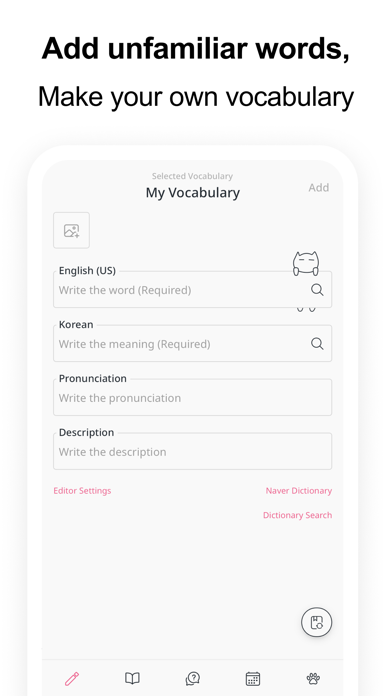
You can create your own vocabulary with no limit to the number of words, and use the app even without data :)
The cute cat Nero is a bonus.
Easily create your own vocabulary
• Just enter a word and Google Translator automatically completes the meaning, part of speech, and synonyms.
• It is very convenient to use, so you can easily add words.
• You can easily find the results of Naver Dictionary and Google Translate with one click of a button.
• You can create a vocabulary in Excel or Google Sheets and easily add it to the app in CSV format.
Record with images
• You can select a photo from the album and record it with words.
• You can record by taking pictures with the camera directly.
Share it easily
• You can share the vocabulary as CSV.
• Share the vocabulary with your friends to study together.
Back up safely
• You can back up your entire data as a file.
• Back up your entire data to Google Drive with the click of a button to keep it safe.
Use the vocabulary prepared in the bookstore
• English
• SAT words
• Japanese
• JLPT
• Chinese
• HSK
• Medicine
See what you've studied on the calendar
• You can see the words added that day on the calendar.
• Quiz history is also displayed on the calendar, so you can review it.
Learn by taking quizzes
• At the end of the quiz, you can retest by collecting only the wrong words.
• Swipe Cards (FlashCard)
• Multiple Choice
• Dictation
• Blinker
Get word alerts
• It is important to see the words often!
• You can receive word notifications at any time you want.
Plan your study schedule
• You can make a schedule by specifying how many words in the vocabulary to study per day.
• According to the learning schedule, you can select only the words you want to learn today and take the quiz.
Listen to the words
• Words will be read using the built in speech engine (TTS, Text To Speech).
• You can listen to words like listening to music.
The following languages are supported
• Afrikaans
• Albanian
• Amharic
• Arabic
• Armenian
• Assamese
• Aymara
• Azerbaijani
• Bambara
• Basque
• Belarusian
• Bengali
• Bhojpuri
• Bosnian
• Bulgarian
• Catalan
• Cebuano
• Chinese (Simplified)
• Chinese (Traditional)
• Corsican
• Croatian
• Czech
• Danish
• Dhivehi
• Dogri
• Dutch
• English (US, UK, Ireland, In