Air Navigation - VFR & IFR

Air Navigation - VFR & IFR Summary
Air Navigation - VFR & IFR is a free, with in-app purchases iOS app in Maps And Navigation by Flygo-Aviation Ltd. Released in Sep 2021 (5 years ago). It has 38 ratings with a 4.34★ (good) average. Based on AppGoblin estimates, it reaches roughly 176 monthly active users and generates around $<10K monthly revenue (100% IAP / 0% ads). Store last updated Oct 4, 2026
SDK intelligence: AppGoblin detected 3 development tools(e.g. Google), 1 ad networks,and 1 analytics: product integrated into Air Navigation - VFR & IFR. View full SDK list →
Air Navigation - VFR & IFR SDKs Summary
Air Navigation - VFR & IFR was last scanned for SDKs on 2026-07-01. Below is the overview of third-party companies detected in the app. The full list of SDKs, permissions and unknowns is available here.
 Google
 nanopb
 Reachability
 Firebase
4.34★
Ratings: 38
Screenshots


App Description
Air Navigation - VFR & IFR is the ultimate flight planning and navigation app for pilots. Plan VFR or IFR flights with worldwide charts, real-time weather (METAR/TAF), NOTAMs, airspace alerts, terrain awareness, airport information, and more – all in one easy-to-use app.
Download and try PRO free for 1 month! *
Features:
• Route planning
Create and save routes with 50,000+ airports, navaids, and waypoints.
• Maps and charts, connected to GPS
Navigate with updated sectional and en-route charts in the US and EU **. Customize maps with airports, airspaces, navaids, and weather layers.
• Weather
Access worldwide METAR and TAF reports.
• Offline use
Download maps, charts, and terrain for offline flying.
• Terrain avoidance system ***
Terrain coloured red and yellow against your GPS altitude in the air, and on the ground against a preview altitude above the field — so what is red is what stands in the way of the departure.
• Airspace alerts
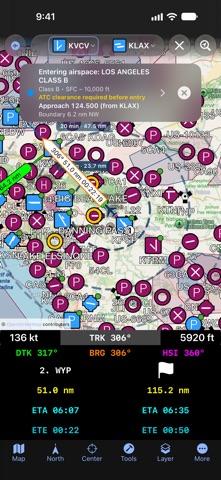
A banner names the airspace you are approaching or entering, its class and vertical limits, the distance to its boundary, and the frequency to call — derived from the aerodrome's published data, so always verify it.
• EHSI / RMI instruments
Fly procedures with digital navigation instruments.
• Nearby airports
Quickly find alternate airports, their distance, and relative direction.
• Real-time flight information
Heading, track, distance, ETA, ETE, speed, and waypoints.
• iCloud synchronization
Sync your data between multiple devices.
• Airport information & diagrams
Runways, frequencies, navaids, NOTAMs, and weather data. Runway diagrams with the wind — now or at any TAF time — and to-scale airport diagrams with taxiways and your position.
• NOTAMs
Runway closures highlighted, cancelled filings followed, duplicate filings folded together, and the distance to each one.
• User points
Add custom waypoints by tapping the map or entering coordinates.
• Quick tap mode
Tap any location to view airspace, frequencies, SIGMETs, AIRMETs, and runway data. The airspace column draws every airspace above the point to its height.
• SIGMETs & AIRMETs
Global weather advisories displayed on the map.
• Advanced search
Find airports by name, city, ICAO, or IATA.
• Units & north reference
Imperial (US) or metric units, magnetic or true north.
• Taxiing & runway awareness
The airport dia