HyperSlow Pro
HyperSlow Pro Summary
HyperSlow Pro is a mobile iOS app in Photo And Video by LiveSkills Menssen & Ebelt GbR. Released in Apr 2023 (3 years ago). It has 2.00 ratings with a 5.00★ (excellent) average. Based on AppGoblin estimates, it reaches roughly 1.00 monthly active users . Store metadata: updated Apr 5, 2026.
Store info: Last updated on App Store on Apr 5, 2026 .
5★
Ratings: 2.00
Screenshots
App Description
HyperDeck instant replay and sport streaming instant replay with HyperSlow Pro App v. 1.0, the next generation of the popular HyperSlow app.
Successor to popular HyperSlow app!
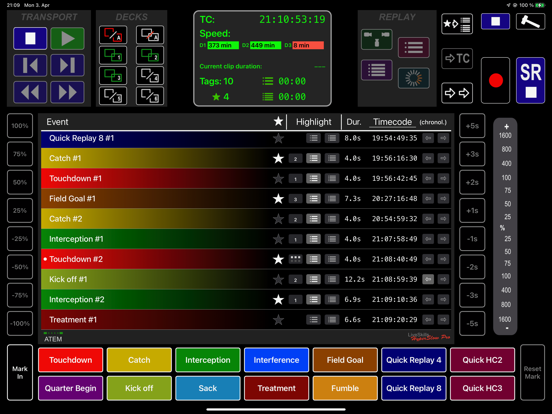
When combining up to 6 Blackmagic HyperDecks (and optionally an ATEM switcher) with an Apple iPad running HyperSlow Pro, users get a powerful, low cost live instant replay solution, suitable for sports events of all kind.
The easy way to do instant replay!
With 2x Highlight Cut, Multi angle replay, 2x Quick replay and 2x Quick highlight cut.
With Mark In, Mark reset and 10 event buttons to mark events.
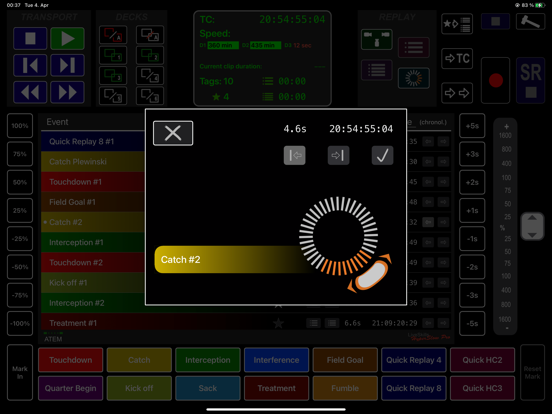
Every event can be trimmed and edited afterwards with an integrated jog tool for single events as also to edit events in the multi angle and highlight mode.
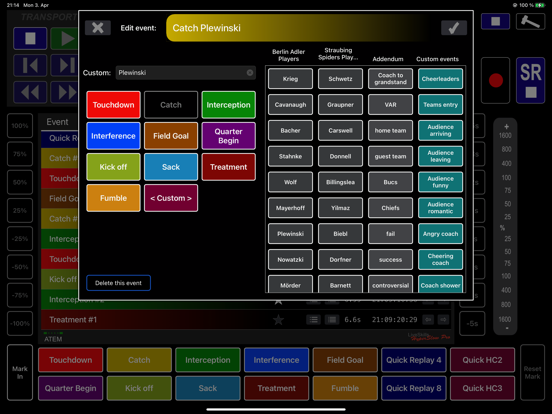
You have the ability to edit and rename every event afterwards, if you want an addend like „Goal-player-free kick“.
With the 4 column Excel import of event tagging items, e.g. all player names, you can rename your events uniquely and precisely.
The app multi deck display shows the remaining disk duration of the connected HyperDecks as well as the number of tagged and favorited events.
It also shows the expected duration of Highlight Cuts and the accumulated event duration from „Mark In“ until you touch an event button.
Use your Blackmagic Hyperdeck Studio, Studio Pro, HyperDeck Studio Mini or one of the 4 new HyperDecks to generate stunning slow motion playbacks with HyperSlow Pro!
HyperSlow Pro can be used to control up to 6 HyperDecks simultaneously from your iPad.
Use up to 10 “event buttons” to mark important events and play back these events synchronously or sequentially from all decks.
You can customize the name of every event button and save it as new event template.
Use 2 quick replay buttons for super fast multi angle replay of unexpected events with 2 predefined durations, you can rename them later.
Use the “Highlight Cut” functionality to play back a series of interesting scenes automatically, e.g. the summary of a match half. When an ATEM switcher is connected, HyperSlow will handle channel switching as well as start/end transition (e.g. stinger) automatically.
A highlight cut can be deleted (not the events itself) after playback to start over with an empty highlight timeline for the next event.
The “SuperHighlight Cut” is intended to playback the highlights of a whole event independently