Money Manager Debudori Profit

Money Manager Debudori Profit Summary
Money Manager Debudori Profit is a ad-supported, with in-app purchases iOS app in Finance by NilCraft Inc.. Released in Jun 2021 (5 years ago). Store metadata: updated Mar 11, 2026.
Store info: Last updated on App Store on Mar 11, 2026 .
0★
Ratings: 0
Screenshots


App Description
The popular "Everyday Debudori" now has a cute, simple household budget app!
This easy budget app requires inputting just three things: date, category, and amount. It's specifically designed to make comparing monthly income and expenses simple. If you want to manage your finances easily, please give it a try.
Want to manage income and expenses but find input tedious and can't keep it up?
Started inputting but gave up after just three days?
Forgot to input and stopped when the amounts didn't match?
To solve these problems, we designed it with a simple layout and minimal input fields for smooth, effortless entry. It also features a daily reminder notification to prevent forgotten entries. It automatically calculates and inputs the carryover amount from the previous month, ensuring your totals balance.
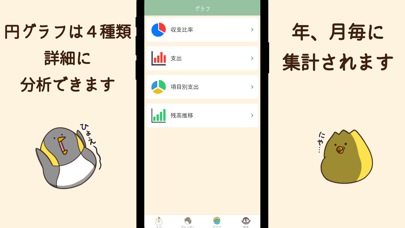
We optimized the design for easy overviews: a list view and calendar view let you grasp your income and expenses at a glance. Four different graphs help you see exactly where your money went.
Its simple design also makes it suitable as a basic household ledger.
It's also recommended for those who want to manage their finances effortlessly.
Please use Debudori's Simple Household Ledger to visualize your income and expenses, review unnecessary spending, and optimize your finances.
If you have any feedback or requests, feel free to contact us via the app's settings screen.
We will review and make adjustments as needed.
--- Screen & Feature Overview ---
【Input Screen】
・Only 3 fields: Date, Category, Amount
・Select previously entered categories; hide unnecessary ones
・Includes calculator function
【Calendar View Screen】
・Monthly display; switchable months
・Carry over entries from previous month
【Graph Screen】
・Pie chart showing income/expense ratio
・Bar chart displaying total expenses
・Percentage and amount shown per category
The above 3 can be aggregated yearly or monthly.
・Balance trend displayed monthly
【Settings Screen】
・Closing date configurable
・Initial screen upon app launch customizable
・Theme color changeable
・Choose from 60 wallpapers (240 in Premium)
・Calculates total assets from input data
・Reminder notifications prevent missed entries; set at preferred times
・iCloud backup included; transfers to new devices
- Supports Widget display.
・Check balances, monthly income/expenses, income, and expenses.