Side Notes: Pros & Cons List

Side Notes: Pros & Cons List Summary
Side Notes: Pros & Cons List is a free, with in-app purchases iOS app in Productivity by Straw Technologies. Released in Feb 2021 (5 years ago). It has 32 ratings with a 4.19★ (good) average. Based on AppGoblin estimates, it reaches roughly 59 monthly active users and generates around $<10K monthly revenue (100% IAP / 0% ads). Store last updated Oct 2, 2026
Side Notes: Pros & Cons List SDKs Summary
App not yet scanned for SDKs.
4.19★
Ratings: 32
Screenshots


App Description
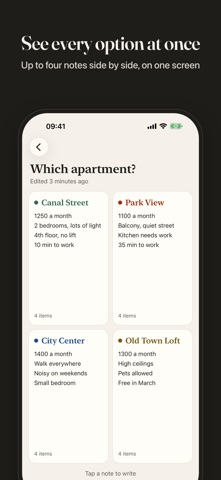
See both sides of every decision at once. Side Notes shows several notes on one screen, so your pros and cons, two options or a SWOT analysis sit side by side instead of hiding in separate lists.
Pick a template, start typing, and compare at a glance. Free, with no ads and no account.
START FAST WITH TEMPLATES
• Pros & Cons: two columns, one clearer answer
• Option A vs Option B: compare two choices side by side
• SWOT analysis: strengths, weaknesses, opportunities and threats in one grid
• Eisenhower matrix: sort tasks by urgent and important
• Retrospective: went well, to improve, ideas, actions
• Blank board: any layout, your own structure
THREE LAYOUTS FOR THE WAY YOU THINK
• Dual: two notes side by side
• Four: a 2x2 grid for matrices and frameworks
• Single: one full note when you need room to write
Tap any note to edit it full screen, then swipe to move to the next one.
MADE FOR REAL DECISIONS
Should you take the job offer? Which apartment, which laptop, which city? Put every argument where you can see it. Run a SWOT on a business idea or a career move, plan your week with the Eisenhower matrix, and close a project or a sprint with a retrospective.
ON ALL YOUR DEVICES, NO SIGN UP
Your boards sync with iCloud across iPhone, iPad and Mac. There is no account to create and nothing to log in to.
WRITE, THEN FIND IT AGAIN
• Rich text formatting such as bold and italic (iOS 26 and later)
• Word count on every note
• Search board titles and note content, filter by Today or This week
• Swipe to duplicate or delete a board, or long press for more options
SHARE YOUR THINKING
Export any board as a PDF or share it as text, ready for a meeting, a teammate or your future self.
MAKE IT YOURS
Light or dark mode and the Ink accent color, with Brick, Forest and Ocean in Side Notes Plus. A calm, paper-like design with serif titles.
GREAT ON IPAD AND MAC
More room to see every note at once, plus keyboard shortcuts on iPad and Mac (Apple silicon).
Fully translated into 34 languages and redesigned for the latest iOS with Liquid Glass.
GO FURTHER WITH SIDE NOTES PLUS
Everything above stays free. Side Notes Plus is an optional upgrade for when you want more:
• Advanced templates: weighted decision matrix, OKR, weekly review, 5 whys
• Your own templates: save any board as a template
• Lock a board with Face ID or Touch ID
• All acc
Data also available via the AppGoblin MCP and API (/api/v1/apps/{store_id}).