Computer Mouse: Remote Control
Computer Mouse: Remote Control Summary
Computer Mouse: Remote Control is a ad-supported, with in-app purchases iOS app in Tools by Умное Потребление. Released in May 2021 (5 years ago). It has 224 ratings with a 3.78★ (average) average. Based on AppGoblin estimates, it reaches roughly 708 monthly active users and generates around $<10K monthly revenue (29% IAP / 71% ads). Store metadata: updated Mar 17, 2026.
Recent activity: 1.00 new ratings this week View trends →
Store info: Last updated on App Store on Mar 17, 2026 .
3.78★
Ratings: 224
Screenshots



App Description
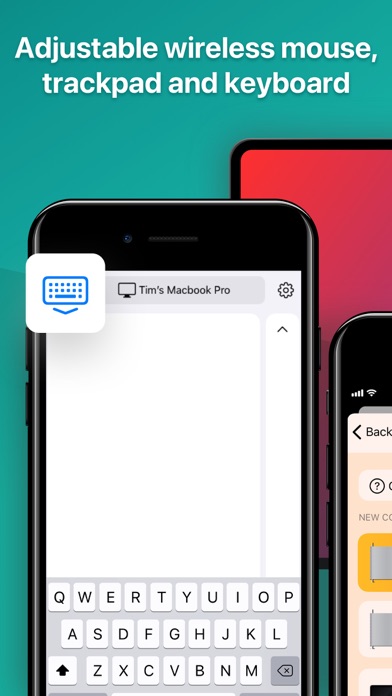
Convenient tool* that works as a trackpad and transforms your phone into a remote mouse, wireless keyboard and Mac controller.
Never be caught without a mouse or keyboard again – your phone is always within reach, ready to take control anytime, anywhere.
Seamless Connectivity & Control
Simply install the app and connect to your Mac via Wi-Fi – it’s that easy! Replace your trackpad, keyboard, and even remotely control multimedia and your browser – all from the convenience of your phone.
You no longer have to worry if it turns out that your mouse is broken or run out of power, because your phone is always at hand and you can use it anytime and anywhere.
Browser & Multimedia Control
Control your music, videos, and presentations with ease. Navigate the web, control tabs, and manage bookmarks.
Customizable Experience
For ease of use, the application offers a number of control settings. Fine-tune your control with adjustable trackpad sensitivity, scroll speed, and direction. Switch to left-handed mode for comfortable operation.
Theme Customization
A stylish design of the app is coupled with a large variety of themes - you can choose the color you like the most.
MAIN FEATURES:
Full Mouse & Trackpad Control: Experience precise cursor movement and intuitive gestures.
Wireless Connectivity: Connect seamlessly to your Mac via Wi-Fi & IP pairing.
Keyboard Functionality: Type comfortably with a full-screen keyboard.
Customizable Sensitivity: Adjust trackpad and mouse sensitivity to your preference.
Left-Handed Mode: Switch to a comfortable layout for left-handed users.
Stylish Themes: Personalize the app’s appearance with a variety of eye-catching themes.
Simple & Intuitive Interface: Enjoy a user-friendly experience with easy navigation.
HOW TO USE:
1. Download and install Computer Mouse app on your iPhone or iPad.
2. Download and install this server on your Mac.
3. Run the server.
4. Configure the firewall to allow access if necessary.
5. Connect your device to the same Wi-Fi network as your computer.
6. Run the app, tap «Select computer» on top of the screen and choose the Mac you want to connect to.
*This is a server software to accompany the application for iPhone and iPad.
You also need to install the application on your smartphone or tablet and connect your device to the same Wi-Fi as a computer
Please, keep in mind that some features are li