Check Calendar - Habit Tracker

Check Calendar - Habit Tracker Summary
Check Calendar - Habit Tracker is a free, with in-app purchases iOS app in Productivity by naoki otsu. Released in Apr 2021 (5 years ago). It has 6.8K ratings with a 4.68★ (excellent) average. Based on AppGoblin estimates, it reaches roughly 16K monthly active users and generates around $<10K monthly revenue (100% IAP / 0% ads). Store last updated Oct 2, 2026
Recent activity: 15 new ratings this week View trends →
Check Calendar - Habit Tracker SDKs Summary
App not yet scanned for SDKs.
4.68★
Ratings: 6.8K
Screenshots
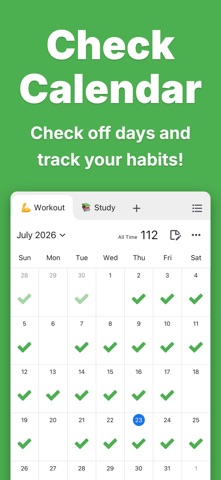


App Description
Check Calendar is an app that lets you track your habits by marking them off on a calendar.
It's packed with features like one-tap check-offs, notes, unlimited tabs, emojis, reports, notifications, backup & restore, widgets, dark mode, and more.
■ Check off on the calendar
Track your habits by checking them off on the calendar with a single tap.
■ Notes
Supports both short and long notes! Write freely to keep your records.
■ Unlimited tabs
Create unlimited categories like "Workout," "Study," and "Reading."
■ Emojis
Change your checkmark to any emoji you like.
■ Checkmark color
Change your checkmark to any color you like.
■ Reports
Visualize your habit progress with graphs. You can freely change the time range, such as "Last 7 days," "Last 28 days," or "Last 6 months."
■ History
View your check-off history, a list of past notes, and more.
■ Notifications
Send notifications at any time with any message you choose. Use them so you never forget your habits.
■ Backup / Restore
Automatically back up and restore your data. You can transfer your data even across different devices.
■ Widget
Check off on the calendar and view your totals right from the widget, without opening the app.
You can also use the report widget to quickly check your cumulative, this month, and last month check-off counts.
■ Dark mode
Choose your theme from "Light mode," "Dark mode," or "Switch automatically based on device settings."
■ Color theme
Change the background color to any color you like.
■ Archive
Hide calendars you don't want to see by archiving them.
■ Biometric authentication
Supports Face ID and Touch ID. Keep your important records safe and secure.
■ CSV export
Export an individual calendar or all of your data in CSV format.
■ Check count
Freely set how many times you can check off per day.
■ Security
Your data is stored only on your device. It is never sent to third parties.
■ No login required
Start using the app right away without signing in.
■ Offline support
Works even without an internet connection.
■ Privacy Policy
https://checkcalendar.app/privacy-policy
■ Contact
If you have any requests or questions, please feel free to reach out through the in-app contact form or via the email address below.
info@checkcalendar.app