Mp3 Converter & Audio Editor

Mp3 Converter & Audio Editor Summary
Mp3 Converter & Audio Editor is a free, ad-supported, with in-app purchases iOS app in Music And Audio by Beat Squad LLC. Released in Aug 2021 (5 years ago). It has 2.5K ratings with a 4.72★ (excellent) average. Based on AppGoblin estimates, it reaches roughly 4.9K monthly active users and generates around $<10K monthly revenue (25% IAP / 75% ads). Store last updated Sep 15, 2026
Recent activity: 1.00 new ratings this week View trends →
SDK intelligence: AppGoblin detected 2 ad networks(e.g. Google), 2 development tools, 2 analytics: product,and 1 analytics: attribution integrated into Mp3 Converter & Audio Editor. View full SDK list →
Mp3 Converter & Audio Editor SDKs Summary
Mp3 Converter & Audio Editor was last scanned for SDKs on 2026-10-26. Below is the overview of third-party companies detected in the app. The full list of SDKs, permissions and unknowns is available here.
 Google
 Facebook
 nanopb
 AppsFlyer
 Firebase
 Amplitude
4.72★
Ratings: 2.5K
Screenshots



App Description
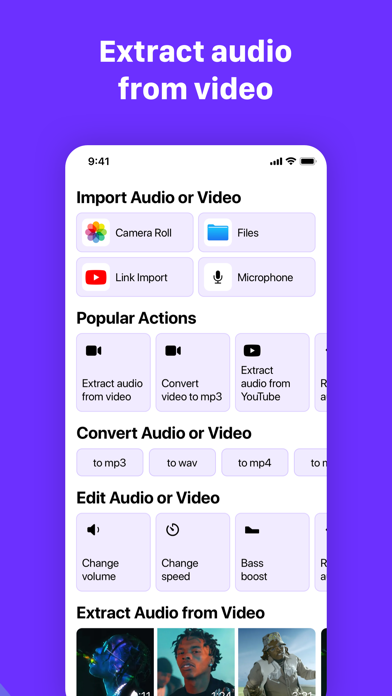
Audio Editor is the quick way to fix, trim and polish any sound on your iPhone, iPad or Mac. Open a recording, a song or a video, make your edits in a few taps, and save the result in whatever format you need.
It's simple enough for a first-time user and deep enough for people who edit audio every day.
WHAT YOU CAN DO
Get audio in from anywhere
• Import from Files, Photos or any other app with a share sheet
• Pull the soundtrack out of a video
• Grab audio from a link
• Record from the microphone, or record straight into the middle of a file you're already editing
Edit with precision
• Trim, cut out the middle, or mute a part without changing the timing
• Join files by adding audio to the beginning or end
• Pinch to zoom on the waveform and type exact start and end times
• Apply any effect to just the selected part
• Remove all the silent gaps in one go
• Full undo history, so nothing is ever lost
Make it sound better
• Remove background noise and keep the voice
• 8-band equalizer for real control over the sound
• Smart Bass Boost that goes deep without distorting
• Echo and reverb, from a small room to a cathedral
• Change speed or pitch, reverse, Lo-Fi, distortion and more
• Split a song into vocals, drums, bass and chords
• Tuner and a loudness meter to check your track before you share it
Create from scratch
• Generate tones and white, pink or brown noise for test signals, beeps and sleep sounds
• Repeat a selection to build loops
• Insert silence exactly where you need a pause
Save it your way
• Export to mp3, wav, m4a, aac, flac, ogg, opus, aiff, caf and more
• Save any audio as a ringtone
• Keep your own export presets for one-tap exports
Stay organized
• A library with folders for your projects, clients and episodes
• Batch rename, sorting and search
• Pick your own accent and waveform colors
A subscription unlocks exporting with all effects, plus unlimited folders, batch rename, custom export presets and no ads.
Every update starts with a message from someone like you. If there's a feature or effect you're missing, tell us: drumpads24help+audioeditorios@gmail.com
Terms of Service: https://www.drumpads24.com/legal/terms-of-service
Privacy Policy: https://www.drumpads24.com/legal/privacy-policy