ArtWorkout: Learn How to Draw

ArtWorkout: Learn How to Draw Summary
ArtWorkout: Learn How to Draw is a free, ad-supported, with in-app purchases iOS app in Education by Aleksandr Ulitin. Released in Apr 2021 (5 years ago). It has 684K ratings with a 4.56★ (excellent) average. Based on AppGoblin estimates, it reaches roughly 1.4M monthly active users and generates around $200K+ monthly revenue (58% IAP / 42% ads). Store last updated Oct 12, 2026
Recent activity: 4.9K new ratings this week View trends →
SDK intelligence: AppGoblin detected 13 ad networks(e.g. Google), 5 development tools, 2 analytics: product,and 2 analytics: attribution integrated into ArtWorkout: Learn How to Draw. View full SDK list →
ArtWorkout: Learn How to Draw SDKs Summary
ArtWorkout: Learn How to Draw was last scanned for SDKs on 2026-09-23. Below is the overview of third-party companies detected in the app. The full list of SDKs, permissions and unknowns is available here.
 Google
 Facebook
 AppLovin
 Unity
Unity Airbnb Engineering
 Rive
Rive nanopb
 Firebase
 AppHud
 Adjust
 AppMetrica
4.56★
Ratings: 684K
Screenshots




App Description
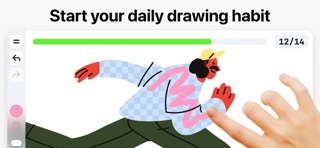
ArtWorkout is your personal drawing trainer. Learn to draw step by step, even if you've never picked up a pencil – or use it as a daily warm-up if you already have sketchbooks full of work. Every lesson is short, interactive, and built around real practice. You don't watch videos – you draw, and the app reacts to every stroke, giving instant feedback so you always know what's working. ArtWorkout meets you where you are and guides you forward – one bite-sized lesson at a time.
Why ArtWorkout?
- 3500+ interactive lessons, with new content added regularly
- Carefully structured drawing courses for every skill level
- Real-time stroke analysis – measures the accuracy and quality of every line you draw
- Immediate feedback after each exercise, so you always know what to improve
- Bite-sized lessons that fit into a coffee break
- Apple Pencil support – natural, pressure-sensitive drawing on iPad
- Designed by working artists and educators, for everyone
Draw Together: Multiplayer Drawing
ArtWorkout isn't just solo practice – it's drawing as a shared experience. Connect with friends, family, or learners around the world and draw on a shared canvas in real time. Draw with someone half a world away.
- Invite a friend to your canvas with a single tap
- Real-time collaborative drawing on a shared canvas
- Race through guided lessons side by side
- Join a global community discovering the joy of drawing together
- Perfect for kids, classrooms, art teachers, and parents drawing with their children
Draw to Relax
Not every session has to be a workout. Open ArtWorkout in the evening, pick a calm lesson, and let your hand wander – a quiet way to unwind.
Learn to Draw, Step by Step
Drawing feels overwhelming when you don't know where to start. ArtWorkout breaks it down into clear, achievable steps:
- Start with simple shapes, lines, and your very first strokes
- Move into doodles, sketches, and confident line work
- Build up to shading, perspective, anatomy, and full illustrations
- Interactive courses in Doodling, Sketching, Drawing, Painting, Handwriting and Lettering
How Is ArtWorkout Different?
Most drawing apps hand you a blank canvas and walk away. ArtWorkout actually teaches you. The app measures your accuracy on every stroke and evaluates the quality and confidence of your lines, not just where you tap. Skill trainers go far beyond basic line tracing