Moving Maze & Battle Flag Pos
ASO Keyword Dashboard
Tracking 54 keywords for Moving Maze & Battle Flag Pos in Apple App Store
Moving Maze & Battle Flag Pos tracks 54 keywords (no keywords rank yet; 54 need traction). Key metrics: opportunity 71.0, difficulty 38.8.
Tracked keywords
54
0 ranked • 54 not ranking yet
Top 10 coverage
—
Best rank — • Latest leader —
Avg opportunity
71.0
Top keyword: battle
Avg difficulty
38.8
Lower scores indicate easier wins
Opportunity leaders
- 67.9
battle
Opportunity: 73.0 • Difficulty: 45.2 • Rank —
Competitors: 443
- 66.2
position
Opportunity: 73.0 • Difficulty: 40.9 • Rank —
Competitors: 92
- 62.9
keyboard
Opportunity: 73.0 • Difficulty: 39.1 • Rank —
Competitors: 85
- 66.9
moving
Opportunity: 73.0 • Difficulty: 41.4 • Rank —
Competitors: 157
- 63.5
direction
Opportunity: 73.0 • Difficulty: 39.2 • Rank —
Competitors: 98
Unranked opportunities
battle
Opportunity: 73.0 • Difficulty: 45.2 • Competitors: 443
position
Opportunity: 73.0 • Difficulty: 40.9 • Competitors: 92
keyboard
Opportunity: 73.0 • Difficulty: 39.1 • Competitors: 85
moving
Opportunity: 73.0 • Difficulty: 41.4 • Competitors: 157
direction
Opportunity: 73.0 • Difficulty: 39.2 • Competitors: 98
High competition keywords
every
Total apps: 120,071 • Major competitors: 2,501
Latest rank: — • Difficulty: 53.7
right
Total apps: 89,991 • Major competitors: 1,646
Latest rank: — • Difficulty: 53.4
key
Total apps: 62,180 • Major competitors: 543
Latest rank: — • Difficulty: 49.0
directly
Total apps: 52,021 • Major competitors: 716
Latest rank: — • Difficulty: 50.5
top
Total apps: 46,690 • Major competitors: 1,080
Latest rank: — • Difficulty: 50.3
All tracked keywords
Includes opportunity, difficulty, rankings and competitor benchmarks
| Major Competitors | |||||||
|---|---|---|---|---|---|---|---|
| top | 69 | 100 | 50 | 78 46,690 competing apps Median installs: 550 Avg rating: 4.2 | — | — | 1,080 major competitor apps |
| battle | 73 | 100 | 45 | 68 12,066 competing apps Median installs: 1,200 Avg rating: 4.1 | — | — | 443 major competitor apps |
| right | 67 | 100 | 53 | 82 89,991 competing apps Median installs: 500 Avg rating: 4.1 | — | — | 1,646 major competitor apps |
| key | 68 | 100 | 49 | 80 62,180 competing apps Median installs: 450 Avg rating: 4.0 | — | — | 543 major competitor apps |
| directly | 69 | 100 | 51 | 78 52,021 competing apps Median installs: 450 Avg rating: 4.1 | — | — | 716 major competitor apps |
| move | 71 | 100 | 46 | 74 26,735 competing apps Median installs: 500 Avg rating: 4.1 | — | — | 523 major competitor apps |
| click | 71 | 100 | 45 | 74 26,660 competing apps Median installs: 400 Avg rating: 4.0 | — | — | 274 major competitor apps |
| face | 71 | 100 | 46 | 72 22,713 competing apps Median installs: 900 Avg rating: 4.1 | — | — | 543 major competitor apps |
| pass | 72 | 100 | 45 | 69 15,105 competing apps Median installs: 750 Avg rating: 4.1 | — | — | 344 major competitor apps |
| every | 66 | 100 | 54 | 84 120,071 competing apps Median installs: 550 Avg rating: 4.2 | — | — | 2,501 major competitor apps |
| structure | 72 | 100 | 37 | 62 5,020 competing apps Median installs: 350 Avg rating: 4.1 | — | — | 23 major competitor apps |
| position | 73 | 100 | 41 | 66 9,625 competing apps Median installs: 400 Avg rating: 3.9 | — | — | 92 major competitor apps |
| square | 72 | 100 | 40 | 61 4,634 competing apps Median installs: 438 Avg rating: 4.1 | — | — | 83 major competitor apps |
| keyboard | 73 | 100 | 39 | 63 6,058 competing apps Median installs: 700 Avg rating: 4.0 | — | — | 85 major competitor apps |
| button | 71 | 100 | 44 | 72 21,270 competing apps Median installs: 400 Avg rating: 3.9 | — | — | 232 major competitor apps |
| moving | 73 | 100 | 41 | 67 10,592 competing apps Median installs: 450 Avg rating: 4.0 | — | — | 157 major competitor apps |
| direction | 73 | 100 | 39 | 64 6,605 competing apps Median installs: 450 Avg rating: 4.1 | — | — | 98 major competitor apps |
| several | 73 | 100 | 42 | 69 13,323 competing apps Median installs: 450 Avg rating: 4.0 | — | — | 165 major competitor apps |
| purpose | 73 | 100 | 39 | 64 7,258 competing apps Median installs: 300 Avg rating: 4.1 | — | — | 50 major competitor apps |
| upper | 72 | 100 | 36 | 58 2,977 competing apps Median installs: 450 Avg rating: 4.0 | — | — | 25 major competitor apps |
| target | 73 | 100 | 41 | 67 10,194 competing apps Median installs: 450 Avg rating: 4.1 | — | — | 133 major competitor apps |
| stop | 70 | 100 | 46 | 75 30,848 competing apps Median installs: 500 Avg rating: 4.1 | — | — | 483 major competitor apps |
| grid | 73 | 100 | 40 | 63 6,208 competing apps Median installs: 500 Avg rating: 4.1 | — | — | 98 major competitor apps |
| interesting | 72 | 100 | 43 | 69 14,720 competing apps Median installs: 500 Avg rating: 4.0 | — | — | 230 major competitor apps |
| three | 71 | 100 | 45 | 72 22,065 competing apps Median installs: 450 Avg rating: 4.1 | — | — | 327 major competitor apps |
App Description
1. About Moveing Maze
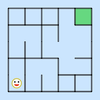
Moving Maze is a novel and interesting game of reasoning. The game aims to move the smiling face from the bottom left corner of the maze to the top right corner. When moving one step, all horizontal walls in the maze move one grid to the left, all vertical walls move down one grid. For every step, the structure of the maze changes. Until you move to the end.
2. How to Play
a. Move: the smiling face can move in four directions, but it cannot pass through the wall. There are three ways to move: click the direction button on the screen, slide on the maze and use the direction key on keyboard(if having).
b. Reset: click the RESET button in the upper right corner.
c. Tip: click the HINT button right above.
B. Battle Flag Position
1. About flag positions
The battle flag position is a novel and interesting game of reasoning. There is a battle flag and several fortresses on the square chessboard. The purpose of the game is to move the battle flag to the target position(star). It will not stop until it meets other pieces, otherwise it will be removed from the chessboard.
2. How to play
a. Move: flags and fortresses can move in four directions. After selecting a piece, there are three ways to move it: directly slide up, down, left and right, click the direction button on the screen, and use the direction key of the keyboard (if any).
b. Reset: click the RESET button in the upper right corner.
c. Tip: click the HINT button right above.