Scanner App - Scan PDF & Docs

Scanner App - Scan PDF & Docs Summary
Scanner App - Scan PDF & Docs is a free, with in-app purchases iOS app in Business by xStudios Mobile. Released in Dec 2021 (4 years ago). It has 116K ratings with a 4.62★ (excellent) average. Based on AppGoblin estimates, it reaches roughly 658K monthly active users and generates around $10K+ monthly revenue (100% IAP / 0% ads). Store last updated Oct 27, 2026
Recent activity: 721 new ratings this week View trends →
SDK intelligence: AppGoblin detected 4 development tools(e.g. Google), 2 ad networks, 1 analytics: attribution, 1 analytics: product,and 1 business tools integrated into Scanner App - Scan PDF & Docs. View full SDK list →
Scanner App - Scan PDF & Docs SDKs Summary
Scanner App - Scan PDF & Docs was last scanned for SDKs on 2026-10-04. Below is the overview of third-party companies detected in the app. The full list of SDKs, permissions and unknowns is available here.
 Google
 Airbnb Engineering
 nanopb
 Alamofire
 Facebook
 One Signal
 AppsFlyer
 Firebase
 Adapty
4.62★
Ratings: 116K
Screenshots



App Description
Looking for a Scanner App?
Discover an all-in-one Scanner App and PDF converter! Turn your mobile device into a portable scanner that automatically recognizes text (OCR) and lets you scan documents, create PDFs, and convert photos into PDF files in seconds.
Say goodbye to bulky copy machines and embrace a paper-free life with this fast and convenient scanner app. If you’re wondering how to scan documents with iPhone or turn a photo into a PDF, this app makes it simple to convert pictures and images into PDF files. Keep your scanned documents organized and easily accessible.
FEATURES
PDF & DOCUMENT SCANNER APP
This scanner app uses your device’s camera to digitize all kinds of paper documents: receipts, notes, invoices, whiteboard discussions, business cards, certificates.
OPTIMIZE SCAN QUALITY
Enjoy smart cropping and auto-enhancing features that help improve the clarity, colors, and readability of your photo scans, making document conversions look professional.
VARIOUS SCANNING MODES
Document Scanner: Scan physical paper documents using automatic edge detection and convert them into PDF files.
ID Card & Passport Scanner: Quickly and easily scan ID documents with this dedicated mode.
Camera Scanning: Use your camera to scan documents in real time and convert photos or pictures into PDF files.
PDF CONVERTER
Create PDFs from documents and images with convenient conversion tools.
Photo to PDF: Capture photos and convert them into PDF files.
Image to PDF: Upload images and convert them into PDFs.
Picture to PDF: Take pictures and save them as PDFs.
Scan to PDF: Scan paper documents and save them in PDF format.
Supported formats: PDF, JPG, DOC, DOCX, TXT, XLS, XLSM, XLSX, CSV, PPT, PPTM, PPTX.
Convert JPG images, photos, and pictures into PDF files with just a few taps.
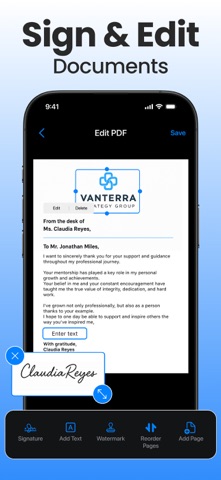
SIGN & STAMP ON THE GO
Draw, scan, or import your signature or stamp directly into the app. With just a few taps, you can sign and convert documents into PDF files, ready to share.
SHARE PDF/JPEG FILES
Easily export and share PDFs, JPEGs, or Word files via social media, email, and more.
BATCH SCANNING BRILLIANCE
Scan multiple pages or documents simultaneously with our efficient batch scanning mode, boosting productivity and saving you time.
BUILT-IN PDF EDITOR
Polish your scans with our built-in editor, offering features like cropping, brightness adjustment, contrast tuning, tex