Calendar Clock Administrator

Calendar Clock Administrator Summary
Calendar Clock Administrator is a free, with in-app purchases iOS app in Medical by Jelter. Released in Aug 2021 (4 years ago). It has 37 ratings with a 4.55★ (excellent) average. Based on AppGoblin estimates, it reaches roughly 115 monthly active users and generates around $<10K monthly revenue (100% IAP / 0% ads). Store last updated Aug 3, 2026
Recent activity: 1.00 new ratings this week View trends →
SDK intelligence: AppGoblin detected 4 development tools(e.g. Google), 1 analytics: product,and 1 business tools integrated into Calendar Clock Administrator. View full SDK list →
Calendar Clock Administrator SDKs Summary
Calendar Clock Administrator was last scanned for SDKs on 2026-07-02. Below is the overview of third-party companies detected in the app. The full list of SDKs, permissions and unknowns is available here.
AppGoblin saw Calendar Clock Administrator uses 1 Analytics: Product
 Firebase
AppGoblin saw Calendar Clock Administrator uses 4 Development Tools
 Google
 SDWebImage
 Flutter
 nanopb
AppGoblin saw Calendar Clock Administrator uses 1 Business Tools
 RevenueCat
4.55★
Ratings: 37
Screenshots


App Description
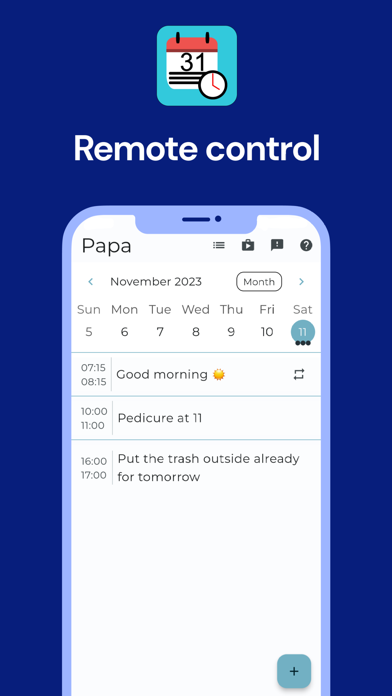
With the Calendar Clock Administrator app, after linking with the Calendar Clock application, messages can be posted remotely on the Calendar Clock application
The Calendar Clock Administrator application can only be used in combination with the Calendar Clock application.
The Calendar Clock is a clock with a message function that supports those with reduced awareness of time and/or memory problems.
Calendar Clock displays the time of day and time (analogue or digital) and also shows important agenda items, reminders and/or personal messages.
Caretakers (professionals, relatives or friends) can schedule, edit and delete messages, reminders or personal messages.
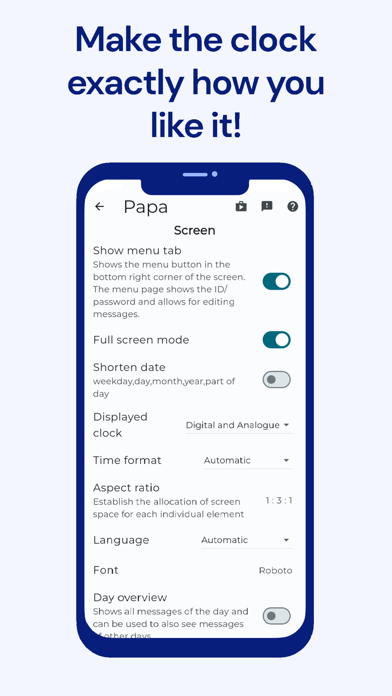
Multiple administrators can connect to the same Calendar Clock - application and therefore post messages. The appearance of the Calendar Clock application can also be changed from this application. Moreover, using the video calling feature, a direct connection can always be established.
This application:
• Is FREE;
• Can create, edit and delete agenda items, reminders and/or personal messages;
• Can disable certain functionalities so that only the desired functionalities remain;
• Can start video calls with Calendar Clock applications;
• Can control multiple Calendar Clock applications;
• Can change the text and background colour;
• Can add pictures and enable the showing of the weather;
• Internet connection is required for the messaging function;
• Synchronization of the message function takes about 30 minutes;
• Stimulates mutual contact;
• Is not a substitute for direct/personal contact.
Privacy Policy: https://calendarclock.app/privacy
Terms and Conditions: https://calendarclock.app/terms