Offline Photo Storage

Offline Photo Storage Summary
Offline Photo Storage is a with in-app purchases iOS app in Photo And Video by Dmitriy Kharutskiy. Released in Dec 2021 (4 years ago). It has 33 ratings with a 4.30★ (good) average. Based on AppGoblin estimates, it reaches roughly 15 monthly active users and generates around $<10K monthly revenue (100% IAP / 0% ads). Store metadata: updated Apr 13, 2026.
Store info: Last updated on App Store on Apr 13, 2026 .
4.3★
Ratings: 33
Screenshots

App Description
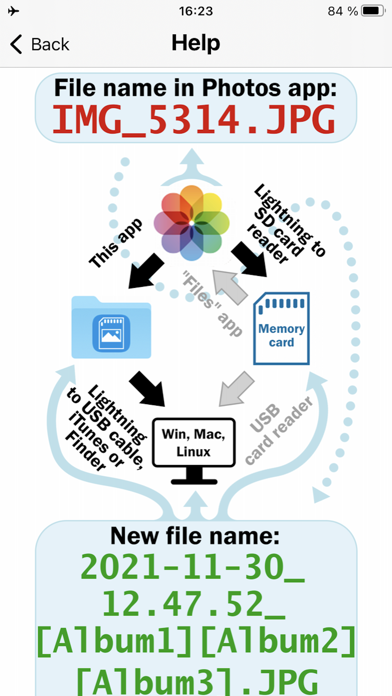
Copy your photos and videos from the iOS "Photos" app to an ORDINARY memory card (or an ORDINARY USB flash drive). From memory cards, photos can be copied to a desktop PC/laptop, or you can use your memory card for storing your photos and videos. All files are copied. For Live Photo, a photo file and a video file are copied. For edited photos and videos, the edited file and the original file are copied (can be turned off). For Burst photos, all photos from the Burst photos are copied.
This is the best way to backup all your photos and videos from iPhone, without iCloud, without iTunes, without desktop/laptop. If you have access to a Mac, using the "Disk Utility" app, you can make a memory card or flash drive for an encrypted backup of photos and videos. In addition, it is a good way to transfer all your photos and videos from iPhone to PC (Windows, Linux or Mac), as all files can be transferred (including the original files of edited photos and videos) and the following data will be saved: information about organizing photos and videos into albums, the date of creation of photos and videos (even if the photo or video was edited or stored in iCloud), file metadata, comments (captions) made in the "Photos" app. If you only need to transfer photos and videos from iPhone to PC (Windows or Mac), while saving this data, then this can be done without an adapter, without a memory card or flash drive.
IMPORTANT! Check the copied files ONLY after reconnecting the memory card, or better check the copied files from a desktop PC/laptop.
IMPORTANT! Be sure to check ALL copied files. At least make sure that large thumbnails can be created for all files in the file manager of the operating system (for iOS, this is the built-in "Files" app).
IMPORTANT! The app does not delete photos and videos that have not been copied (by default). Therefore, in order to avoid accidentally deleting photos or videos that have not been copied, delete photos and videos using this app.
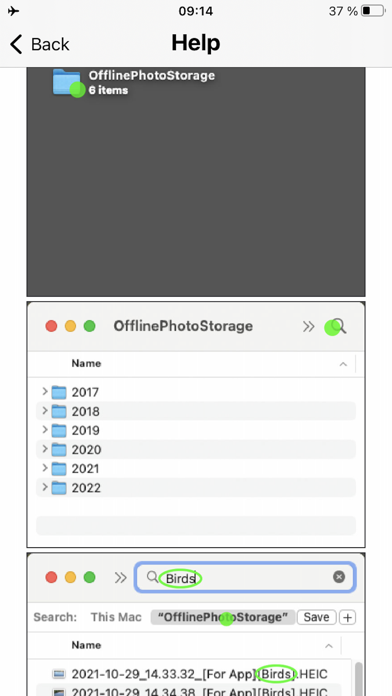
When copying, all file metadata (date created, location, etc.) is preserved. Even the way your photos are organized into albums is preserved. At the same time, you can select and view photos from a specific album in any operating system WITHOUT INSTALLING additional apps or software. It is possible by adding the album names to the file names. This way, photo and video files from a specific album are easily s