Construction Calculator A1

Construction Calculator A1 Summary
Construction Calculator A1 is a free, ad-supported, with in-app purchases iOS app in Productivity by Binary And Bricks Pvt Ltd. Released in Oct 2021 (4 years ago). It has 30 ratings with a 4.77★ (excellent) average. Based on AppGoblin estimates, it reaches roughly 111 monthly active users and generates around $<10K monthly revenue (45% IAP / 55% ads). Store last updated Aug 11, 2026
SDK intelligence: AppGoblin detected 5 development tools(e.g. Google), 2 ad networks,and 1 analytics: product integrated into Construction Calculator A1. View full SDK list →
Construction Calculator A1 SDKs Summary
Construction Calculator A1 was last scanned for SDKs on 2026-07-04. Below is the overview of third-party companies detected in the app. The full list of SDKs, permissions and unknowns is available here.
 Google
 OpenID
 nanopb
 Flutter
 AdMob
AdMob Firebase
4.77★
Ratings: 30
Screenshots


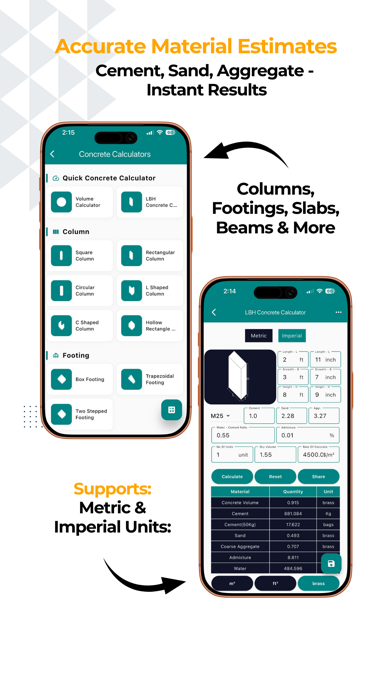


App Description
The #1 construction calculator trusted by 1M+ contractors, builders, and engineers worldwide.
Construction Calculator A1 — the complete civil engineering toolkit for
contractors, builders and engineers. 500+ calculators, from a single slab to a
client-ready Bill of Quantities.
CONCRETE CALCULATOR
• Slabs, footings, columns, beams, stairs, walls & culverts
• Instant material quantities: cement bags, sand, aggregate
• Mix ratios and grade selection for any specification
REBAR & STEEL CALCULATOR
• Bar Bending Schedule (BBS) with shape codes and cutting lengths
• Weight calculator for metric and US bar sizes (#3–#11)
• Lap length, cover & spacing calculations
• Steel tonnage for structural estimates
FEET-INCHES CALCULATOR
• Add, subtract, multiply, divide in feet-inches-fractions
• No decimal conversion needed
• Running tape you can review and reuse
BILL OF QUANTITIES (BOQ) — NEW
• Send any calculation straight to a BOQ
• Organise by project, track total value and % priced
• Professional report with your company header and signature
• Export as PDF or Excel
AUTOMATIC DRAWINGS — NEW
• Calculators draw a dimensioned sketch of what you entered
• Brickwork, steel shapes, concrete sections, excavation, stairs
• Drawings and a DIMENSIONS panel included in every PDF
MATERIAL PRICE LIBRARY — NEW
• Store your own rates in your own currency
• Rates auto-fill into cost fields across the app
• Six regional presets with local materials and units
APPLE WATCH APP — NEW
• Converter, material weight, volume, diagonal and rebar on your wrist
• Prices synced from iPhone, with full calculation history
AREA & VOLUME
• 50+ shapes: rectangle, circle, triangle, trapezoid, polygons, prisms,
cones, spheres and more
• Draw Shape and GPS Area for irregular plots
• Room area, paint coverage, flooring and excavation volumes
UNIT CONVERTER
• Length, area, volume, weight, pressure, power, speed, density and more
• Construction-specific units throughout
LEARN — NEW
• Civil engineering articles, checklists and reference charts
• Topic quizzes with instant explanations
• Daily streaks, XP and achievement badges
PROFESSIONAL FEATURES
• Save and organise calculations by project, with notes and photos
• Share estimates with clients instantly
• Construction cost estimator with breakdown charts and quotations