Video Converter: Compressor

Video Converter: Compressor Summary
Video Converter: Compressor is a free iOS app in Photo And Video by Laxay Gajera. Released in Jul 2025 (1 year ago). It has 2.00 ratings with a 5.00★ (excellent) average. Based on AppGoblin estimates, it reaches roughly 18 monthly active users . Store last updated May 29, 2026
Recent activity: 1.00 new ratings this week View trends →
Video Converter: Compressor SDKs Summary
App not yet scanned for SDKs.
5★
Ratings: 2.00
Screenshots


App Description
Transform, Resize, and Edit your videos instantly with Media Converter!
Whether you need to save storage space by compressing large files, extract music from a video, or convert formats for compatibility, this all-in-one tool makes it simple and fast.
KEY FEATURES:
◉ VIDEO CONVERTER
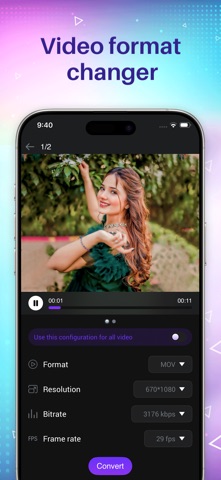
Convert videos to any popular format with zero quality loss.
• Supports: MP4, MKV, AVI, 3GP, MOV, MTS, MPEG, MPG, WMV, M4V, VOB, FLV, and more.
• Perfect for making videos compatible with all your devices.
◉ VIDEO COMPRESSOR
Running out of space? Shrink video file sizes easily.
• Adjust Resolution, Frame Rate (FPS), and Bitrate.
• Reduce file size significantly while maintaining clear quality.
• Great for sharing videos via email or social media.
◉ VIDEO TO AUDIO (MP3 EXTRACTOR)
Turn your favorite video clips into audio files.
• Extract audio from video instantly.
• Supports: MP3, AAC, AC3, OGG, M4A, WAV, and more.
• Create your own playlists or ringtones from video content.
◉ POWERFUL VIDEO EDITOR
• Video Merger: Join multiple clips into one. Supports Sequential, Top-Bottom, or Side-by-Side layouts.
• Video Cutter: Trim unwanted parts with millisecond precision.
• Video Processing: Reverse, Stabilize, Slow Motion, Crop, and Rotate videos.
WHY CHOOSE MEDIA CONVERTER?
• User-friendly interface designed for iOS.
• Fast processing speeds.
• Supports a massive library of video and audio formats.
• No internet required for conversion (works offline).
Download Media Converter today and take full control of your video files!