PlanNet Marketing Reps

PlanNet Marketing Reps Summary
PlanNet Marketing Reps is a mobile iOS app in Productivity by Genesis Media Group, Inc.. Released in Jan 2022 (4 years ago). It has 40 ratings with a 4.10★ (good) average. Based on AppGoblin estimates, it reaches roughly 171 monthly active users . Store metadata: updated Apr 15, 2025.
Recent activity: 1.00 new ratings this week View trends →
Store info: Last updated on App Store on Apr 15, 2025 .
4.1★
Ratings: 40
Screenshots




App Description
Sharing your PlanNet Marketing Opportunities with your Leads, managing and tracking your business and achievements is the key to building a strong and prosperous business. The PlanNet Rep Mobile App is your tool to accomplish this and much more.
You can personally build your list of Leads from people you have met in your everyday life. Friends, relatives, past business associates, events, church members, the list goes on and on. Many of these people may already be in your phones contact list which you can use to share using this App. You can do this literally, with people in over 20 countries where PlanNet Marketing does business as well as through your Social Media accounts.
You can also build and manage a Rep Organization with the tools built into the App.
If your Leads love to travel, then introduce them to your ITA Product by sharing your ITA Videos with them.
Check out the list of features:
1. View Inspirational Messages from President & CFO Andy Cauthen
2. Leads System
a. Build and manage a list of Leads
b. Share your Business Card
c. Share your Replicated website
d. Share the PlanNet Facebook Site
e. Share Marketing Videos in English and Spanish
f. Keep individual Notes and Reminders on Leads
g. Communicate with Leads via Text, Email or Phone
h. Filter, Track and Delete Leads if they are converted or no longer interested
i. View Lead Activity
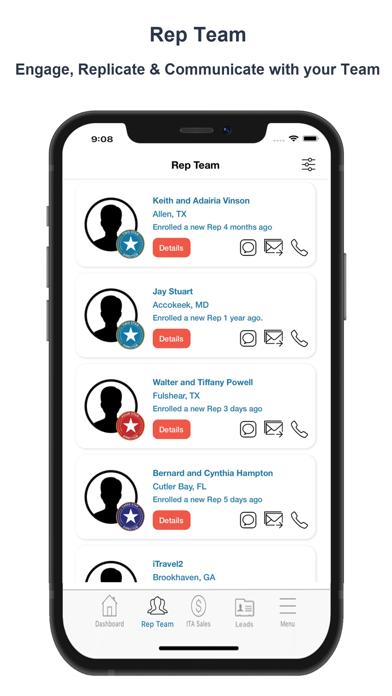
3. Rep Team
a. Track your Rep Team’s Recent Activity/Sales
b. Track your Rep Team’s Stats
c. View their Achievements and congratulate them via Text, Email or Phone
d. Communicate with your Team Members via Text, Email or Phone
4. ITA Sales
a. Track your Personal ITA Sales
b. Filter by Active, Credit Hold or Cancelled
c. Communicate with your ITAs via Text, Email or Phone
5. Get Started - New Reps can start with by viewing this Video and then watch the Training Videos
6. My Account & Business Snapshot
a. Account Profile
I. View your Account Profile
II. View & Communicate with your Sponsor & Director via Text, Email or Phone
b. My Business Snapshot
I. View Commission Summary
II. Rep Status
III. ITA Status
IV. Total Active ITA’s & Reps
V. Purchase Summary
VI. Auto Renewal Status & Next Date
c. View your Achievements
7. Info Center
a. Company News
I. Sort by Calls or Events
II. Read Articles
III. Register for upcoming