Recipe Keeper - Taste

Recipe Keeper - Taste Summary
Recipe Keeper - Taste is a with in-app purchases iOS app in Food And Drink by Thilo Kreisel. Released in Sep 2024 (1 year ago). It has 193 ratings with a 4.71★ (excellent) average. Based on AppGoblin estimates, it reaches roughly 576 monthly active users and generates around $<10K monthly revenue (100% IAP / 0% ads). Store metadata: updated May 22, 2026, version 53.
Data tracking: SDKs and third-party integrations were last analyzed on May 31, 2026.
Store info: Last updated on App Store on May 22, 2026 (version 53).
4.71★
Ratings: 193
Screenshots




App Description
Taste is the ideal solution for managing your recipes simply and intuitively. Whether you want to collect new recipes, organize old favorites, or find inspiration – Taste provides you with the tools to structure your collection. No ads, no registration – start right away and enjoy the clean, streamlined interface.
With Taste, you always keep track of your recipes, from the initial idea to the finished dish. Everything is designed to make managing your recipes as easy as possible, so you can focus on what really matters: cooking.
► Why Taste?
Taste offers the perfect combination of user-friendliness and flexibility to manage your recipes easily and efficiently.
• Clear design: The clean, simple interface helps you stay focused on your recipes, without distractions
• Customizable: Adjust font sizes, colors, and views to suit your preferences, tailoring Taste to your style
• Start immediately: No registration, no ads. You can access all features directly without providing personal data
• Continuous improvement: Regular updates optimize and add new features to improve your experience
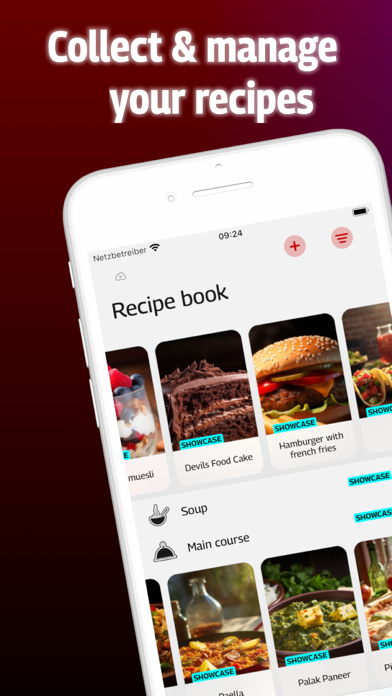
► Recipe Book – everything in view
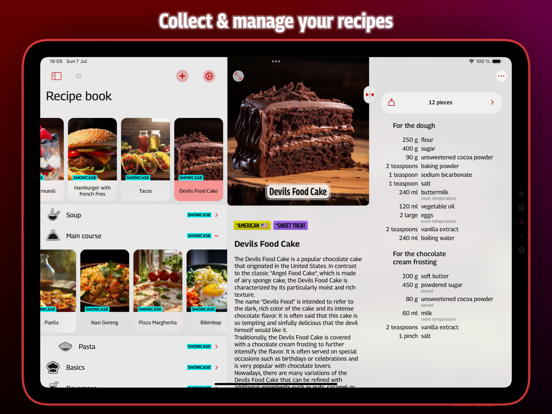
The structured outline view gives you a clear overview of your entire recipe collection on one page. Categories can be nested, similar to a file manager, to organize your recipes efficiently.
• Multiple views: Recipes are displayed in horizontally scrollable lists with two display options for the appearance of recipes, sortable by name or date
• Drag-and-Drop: Easily move recipes and categories via drag-and-drop
• Quick access: Context menus offer fast access to essential functions directly within the recipe book
► Recipe View – all at a glance
The recipe view ensures that all key information such as ingredients, preparation steps, and notes are clearly arranged.
• Automatic scaling: All ingredient quantities automatically adjust to the selected portion size
• Intuitive editing: Edit recipes directly within the view, without additional windows
• Detailed structure: Ingredients, preparation, and notes are clearly separated and easily accessible
► Web Import – recipes from the web
Add recipes directly from the internet – either via the in-app browser or using the Share Sheet.
• In-app browser: Search for recipes on the web and add them directly to your collection
• Smart import: Taste automatically