Voice Table Tennis Scoreboard

Voice Table Tennis Scoreboard Summary
Voice Table Tennis Scoreboard is a ad-supported, with in-app purchases iOS app in Sports by arakawa yuichiro. Released in May 2022 (4 years ago). It has 70 ratings with a 4.70★ (excellent) average. Based on AppGoblin estimates, it reaches roughly 364 monthly active users and generates around $<10K monthly revenue (27% IAP / 73% ads). Store metadata: updated Mar 23, 2026.
Data tracking: SDKs and third-party integrations were last analyzed on Feb 14, 2025.
Store info: Last updated on App Store on Mar 23, 2026 .
4.7★
Ratings: 70
Screenshots



App Description
A table tennis scoreboard app optimized for smartphones and tablets.
Use the smartphone size for casual home games, or the large tablet size for better visibility in larger venues.
■ Features
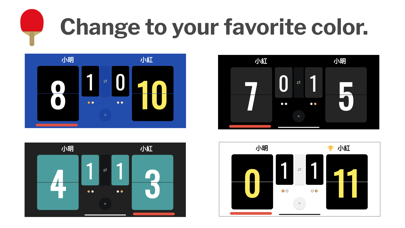
- Realistic page-turning effect!
- Voice announcements for the score!
- View scores for every game in the match results table.
- Update the score directly from the Apple Watch app while playing.
■ Recommended for
- People who want to enjoy table tennis easily.
- Those who forgot a physical scoreboard or find it troublesome.
- Those who want to umpire games smoothly.
- Those who want to display scores on a large screen.
- Those who want to keep a record of match results.
■ How to use
1. Select the match format: 3, 5, or 7 games.
2. Enter player names, decide the serve, and start the match.
3. Tap the bottom of the score panel to add a point.
4. If you make a mistake, "double tap" the top of the score panel to undo the point.
5. When a game finishes, switch sides (change ends) and start the next game.
6. When the match ends, the result is displayed. You can also view past results from the menu.
7. To play the same match again, select "Rematch" from the menu.
8. To start a completely new match, go to the menu and select "New Match."
9. You can turn off voice announcements in the Settings menu.
■ Troubleshooting
- If the Watch app times out or fails to connect: Close both the Watch app and the iPhone app. Launch the Watch app first, then the iPhone app, and try again.
- If the connection loading screen on the Watch app hangs: Long-press the screen to cancel the connection, then try again.