KiLog: Book Movie Game Tracker

KiLog: Book Movie Game Tracker Summary
KiLog: Book Movie Game Tracker is a free, ad-supported, with in-app purchases iOS app in Books And Reference by YUUSUKE SASOU. Released in May 2022 (4 years ago). It has 22 ratings with a 4.59★ (excellent) average. Based on AppGoblin estimates, it reaches roughly 103 monthly active users and generates around $<10K monthly revenue (44% IAP / 56% ads). Store last updated May 1, 2026
KiLog: Book Movie Game Tracker SDKs Summary
App not yet scanned for SDKs.
4.59★
Ratings: 22
Screenshots


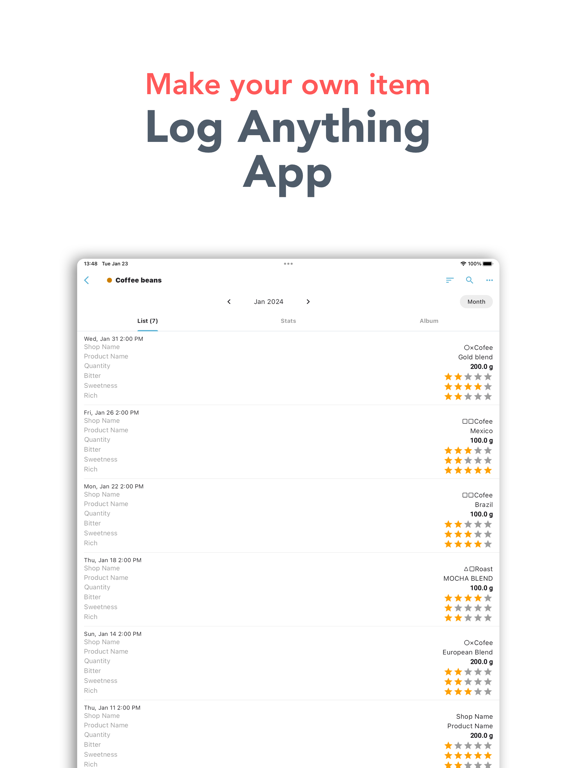


App Description
KiLog is a flexible logging app that lets you track anything you want, your way.
Whether it's books, movies, games, or anything else — you can fully customize the fields and formats to match exactly what you want to record.
View your entries in clean lists, visualize trends with charts, and browse by calendar — all in one app.
■ What Can You Track?
• Books you've read (title, author, rating, notes)
• Movies & TV shows you've watched
• Games you've played & completion status
• Car maintenance, fuel-ups & mileage
• Restaurant reviews & food ratings
• Coffee beans — origin, roast level, tasting notes
• Wine or craft beer tasting logs
• Workouts — gym sessions, runs, reps & sets
• Weight, sleep & daily wellness
• Study hours & certification progress
• Travel destinations & places you've visited
• Client meetings & business contacts
• Plant care — watering schedule & growth tracking
• Pet care — weight, vet visits & feeding logs
• Shopping lists & expense tracking
…and anything else you can think of!
■ Who Is This For?
• You've been using a notes app to track hobbies, but want an easier way to log dates and numbers
• You keep a paper planner for client info, but want to go digital
• You've started buying specialty coffee online and want to remember which ones you liked
• You want to rate and compare your favorite restaurants
■ Features
• Customizable record formats
• List view
• Charts & statistics
• Calendar view
• Search
• Sorting options
• Folder organization
• Passcode lock
• Backup & restore
• CSV export (paid)
• CSV import (paid)
【Custom Record Formats】
Add the fields you need and choose from: integer, decimal, checkbox, rating, date/time, text, or dropdown.
【Add Records】
Select a format and tap (+) to add a new entry. You can attach photos too.
【List View】
Filter entries by month, year, or view all. Display up to 8 fields per entry in the list.
【Charts & Statistics】
View totals, averages, and more as charts. Combine multiple fields into a single custom chart.
【Calendar View】
Quickly see what you logged and when in a calendar layout.
【Folder Organization】
Organize your record formats into folders. Manage folders from the folder list screen.
【Passcode Lock】
Keep your data private with a passcode lock on the app.
【Backup】
Save your app da