BigPaper -Mind Map, PDF Markup

BigPaper -Mind Map, PDF Markup Summary
BigPaper -Mind Map, PDF Markup is a free, with in-app purchases iOS app in Productivity by 学东 齐. Released in Jul 2022 (4 years ago). It has 150 ratings with a 3.62★ (average) average. Based on AppGoblin estimates, it reaches roughly 483 monthly active users and generates around $<10K monthly revenue (100% IAP / 0% ads). Store last updated Sep 9, 2025
BigPaper -Mind Map, PDF Markup SDKs Summary
App not yet scanned for SDKs.
3.62★
Ratings: 150
Screenshots


App Description
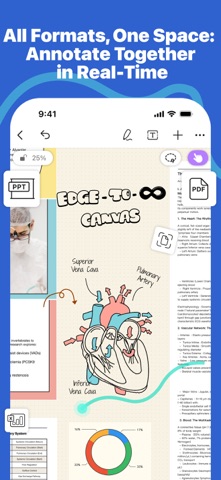
BigPaper is a borderless note taking application. You can import and expand PDFs and other formats in BigPaper and freely take notes in an infinite canvas without being limited by the edges of the document.
You can use BigPaper on both iPhone and iPad for efficient editing with iCloud data sync.
Whether it's annotating PDFs, making handbooks, or creating mind maps, BigPaper is ready to go.
BigPaper's features include multi-format document import, text input, handwriting, mind mapping, tables, scanned documents, free edge screenshots, containers, folder management, search for handwriting and text, etc.
We welcome every rating, and we will read every piece of feedback and take notes to incorporate it in future updates.
Your 5-star review will encourage us to continue to upgrade BigPaper and introduce new features.
—— Introduction of functions ——
「Infinite canvas, freeform add elements」
Canvas can be zoomed and moved for editing.
Add documents in multiple formats such as PDF, as well as multiple types of elements such as tables, text, drawings, handwriting, pictures, stickers, paper, scanned documents, and more. These elements can be scaled and rotated.
「Mind Mapping - Easily connect ideas」
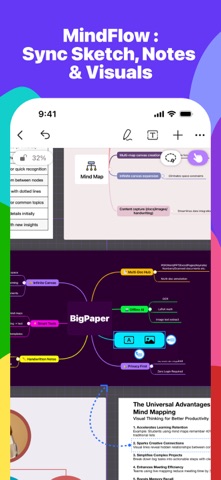
Innovative mind mapping mode. Connect elements on the page (text, pictures, tables, etc.) to quickly generate mind maps from inspiration.
Also support the step-by-step enlargement of the idea by expanding the mind map.
「Type anywhere」
Customize the font, size and color of the text. To-do list, bullets can be added to the text.
「Brush Tool - Handwritten and Drawings」
Customize brush presets including color, transparency, tip size.
Full-screen drawing, freely annotated documents that are not limited by the edges of the document.
Smart Shapes: Hold a stylus or fingertip after drawing a graphic on the screen, intelligently recognize and generate the perfect shape.
「Create Table」
Easy create forms. Add row, add column, move row, move column. Tables can be linked to mind maps.
「Import and Export」
Imported document formats: PDF, Word, PowerPoint, Excel, Pages, Keynote, Numbers, etc.
Expand all pages of the document to easily read and highlight all the content.
Select text in the document to copy.
Export PDF, export image, and BigPaper format. WYSIWYG, everything can be displayed in the exported document.
「Reading Mode」
Customize the "s