VEED Lite: Quick Video Edits

VEED Lite: Quick Video Edits Summary
VEED Lite: Quick Video Edits is a free, with in-app purchases iOS app in Photo And Video by VEED Ltd. Released in Aug 2022 (4 years ago). It has 60K ratings with a 4.82★ (excellent) average. Based on AppGoblin estimates, it reaches roughly 33K monthly active users and generates around $<10K monthly revenue (100% IAP / 0% ads). Store last updated Aug 24, 2026
Recent activity: 30 new ratings this week View trends →
SDK intelligence: AppGoblin detected 5 development tools(e.g. Google), 3 analytics: product, 2 business tools, 1 ad networks,and 1 analytics: attribution integrated into VEED Lite: Quick Video Edits. View full SDK list →
VEED Lite: Quick Video Edits SDKs Summary
VEED Lite: Quick Video Edits was last scanned for SDKs on 2026-09-24. Below is the overview of third-party companies detected in the app. The full list of SDKs, permissions and unknowns is available here.
 Google
 Sentry.io
 Airbnb Engineering
 Apollo
 Facebook
 AppsFlyer
 Firebase
 Braze
Braze Amplitude
 RevenueCat
 Superwall
4.82★
Ratings: 60K
Screenshots


App Description
VEED Lite — AI Quick Edits, Captions & Talking Videos
Fast, AI-powered video editing right on your phone. VEED Lite turns raw clips into polished short-form content in minutes — automatic edits, captions, and AI talking-head videos, with no learning curve. Built for creators, businesses, and anyone posting to Instagram, TikTok, YouTube Shorts, Twitter/X, and LinkedIn.
VEED Lite or VEED — which one do you need?
VEED Lite (this app) is the quick, lightweight option: AI auto-editing, captions, and AI talking videos for clips up to 10 minutes, all done right here on your phone.
VEED (our full app) is the complete AI video creation platform, with stronger customization options, but also a full video editor, support for longer videos, text-to-speech, voice cloning, transitions, background removal, and 50+ additional features - also offering seamless editing across web and mobile, with your projects always kept in sync.
Want a fully-fledged video creation platform, or powerful, cross-device editing? Get VEED.
Staying for fast, AI-first essentials? You're in the right place.
What VEED Lite does
AI Talking Videos — Powered by Fabric
We built Fabric, the best AI video generation model in the game. Create talking videos with AI actors that actually look and sound real.
- Create your own AI actors — describe who you want, and we'll generate them. Full control over appearance, voice, and style.
- Best-in-class talking video quality — Fabric delivers lip-sync, expressions, and motion that competitors can't touch.
- Script to video in minutes — type your script, pick (or create) an actor, and you're done.
This is the fastest way to make talking-head content without filming yourself.
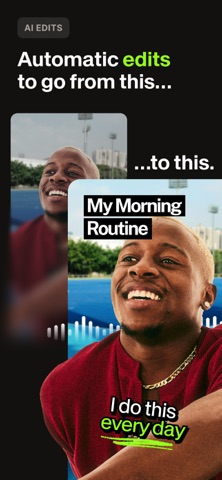
Automatic Editing with AI
Upload or record a video. VEED Lite edits it for you.
- Styles you can swipe through — we apply edits automatically, you pick your favorite.
- Toggle off what you don't like — we'll remember for next time.
- Saves hours per video.
Features That Actually Matter
Auto captions
- Multiple styles, designed to maximize views
- Translate into different languages
- Remove silences and filler words automatically
AI zooms
- We zoom in at key moments, automatically
- This makes your videos much more dynamic
AI background music
- Generate royalty-free music
- No licensing headaches
AI B-roll
- Generate B-roll to support your story
- Multiple styles