Speed Limit Alarm

Speed Limit Alarm Summary
Speed Limit Alarm is a free iOS app in Tools by Cogniter Technologies Pvt Ltd. Released in Sep 2022 (3 years ago). It has 7.00 ratings with a 4.29★ (good) average. Based on AppGoblin estimates, it reaches roughly 13 monthly active users . Store last updated Nov 11, 2024
Speed Limit Alarm SDKs Summary
App not yet scanned for SDKs.
4.29★
Ratings: 7.00
Screenshots



App Description
Speed Limit Alarm is a very unique application which allows you to set multiple speed alarms with a variety of alarm sound options so you can easily identify which speed limit you have exceeded. This app even plays an alarm if it is running in the background.
Some of the core features of this app include
- Display real time speed of the vehicle (Uses GPS)
- Audible alarms when speed is exceeded
- Show speed in Km/h or M/h
- Set unlimited alarms with unique sound for each
- Settings available to choose speed unit (km/h or m/h)
- Control the duration for how long the sound plays so you are able to hear its alert
- The application even tracks speed in background so even if your phone is in sleep mode or you are using your phone for some other activity it will play the alarm
- If Bluetooth sound is connected alarms are played through your car speakers
- Enable or disable alarms quickly and conveniently
- Get speed alarm notifications if the app is running in the background
- Settings available to control when alarm will play (speed is increased, decreased or both)
- View Logs of time and location when speed limit was crossed
- Settings available for video recording
- View video logs
- Portrait and Landscape display
Here are steps which describes how to use this app.
1. Install the app in your mobile device and grant required permissions to the app.
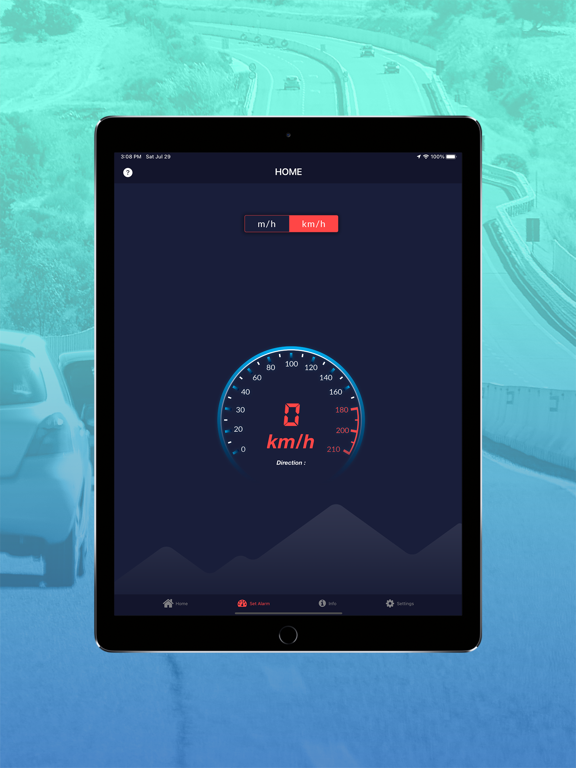
2. Now open the app, Home Screen will show.
3. Now tap “Set Alarm” icon and Set the Alarm for the Speed Limit as per requirement.
4. Once alarm is set, Go to Home Screen of the app.
Home Screen shows Speedometer of the app.
This Speedometer calculates speed of your vehicle based on GPS.
5. Now, start your vehicle and begin the journey.
Once your vehicle’s speed exceeds the speed limit defined in Alarm, sound of alarm will play.
This sound of alarm is indicator that speed limit has been crossed.
Limit your Speed and Increase your Safety with Speed Limit Alarm App.
A simple and fully-functional speed limit application that keeps you alert of over speeding and reminds you to slow down your vehicle. This safety application is featured with real-time speed calculation and plays an alarm as soon as your vehicle’s speed exceeds a specified speed.
The application built-in user-friendly interface where users can simply set speed limit, select audio sound and duration for the alert alarm. It offers