GPS Speedometer・Miles per hour

GPS Speedometer・Miles per hour Summary
GPS Speedometer・Miles per hour is a free, ad-supported, with in-app purchases iOS app in Tools by Nikita Chizhov. Released in Oct 2022 (3 years ago). It has 240 ratings with a 4.43★ (good) average. Based on AppGoblin estimates, it reaches roughly 412 monthly active users and generates around $<10K monthly revenue (35% IAP / 65% ads). Store last updated Oct 3, 2025
Recent activity: -1 new ratings this week View trends →
GPS Speedometer・Miles per hour SDKs Summary
App not yet scanned for SDKs.
4.43★
Ratings: 240
Screenshots


App Description
This is application that uses your phone's GPS to track your speed and other information in real time.
Main Features:
GPS Speedometer:
Get your speed, location information and other useful data in real time. Our application supports various units of measurement.
Apple Watch:
Track your speed, travel time, distance and other useful info in real time ;
Information about the trip is transmitted to your device to create a trip report and view the route on the route map;
Using the map, track your location in real time, as well as choose the right direction;
Choose the units of measurement that are convenient for you.
Map:
With the help of the map, you will be able to track your location at the moment, as well as see the path you have traveled and choose the right direction.
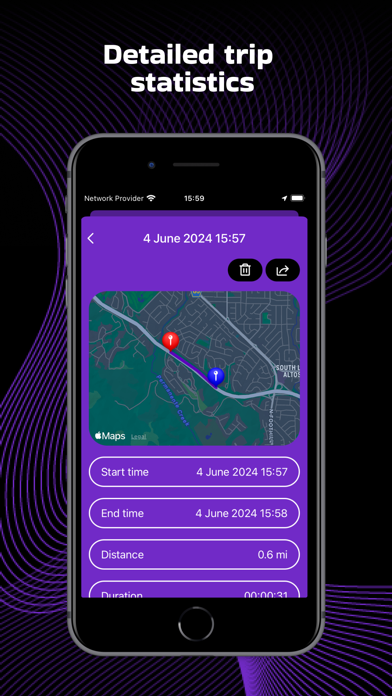
Trip history:
After the end of the trip, you can view the detailed information of your route:
- Start and end time of the trip;
- The distance of the entire route;
- Maximum speed;
- The average speed of your trip;
- Travel time;
- Time spent in motion;
- Parking time;
The application will also create a pdf file of your route, which you can share with your friends.
Speed Limits:
Set a speed limit that you don't want to exceed. As soon as your speed is higher than the one you set, the app will warn you about it.
HUD:
For your convenience, in order not to be distracted by the speedometer, use HUD mode at night, which will create a projection on the windshield.
Themes:
Possibility to choose the theme of the speedometer.
Note:
- Secure your phone so that it does not get hurt while driving and braking.
- Active use of location services may affect battery consumption.
Your subscription automatically renews unless auto-renew is turned off at least 24 hours before the end of the current subscription period. Your iTunes will automatically be charged at the same price for renewal, as stated above, within 24 hours prior to the end of the current subscription period. You can manage your subscription and/or turn off auto-renewal by visiting your iTunes Account Settings after purchase.
Privacy Policy: https://sites.google.com/view/chizhov-privacy-policy/privacy-policy
Terms of use: https://sites.google.com/view/chizhov-terms-of-use/terms-of-use