Refocus: App Blocker & Lock

Refocus: App Blocker & Lock Summary
Refocus: App Blocker & Lock is a free, ad-supported, with in-app purchases iOS app in Productivity by Labi, LLC. Released in Sep 2022 (4 years ago). It has 25K ratings with a 4.73★ (excellent) average. Based on AppGoblin estimates, it reaches roughly 81K monthly active users and generates around $10K+ monthly revenue (38% IAP / 62% ads). Store last updated Oct 25, 2026
Recent activity: 67 new ratings this week View trends →
SDK intelligence: AppGoblin detected 2 ad networks(e.g. Google), 2 development tools, 2 analytics: product,and 1 business tools integrated into Refocus: App Blocker & Lock. View full SDK list →
Refocus: App Blocker & Lock SDKs Summary
Refocus: App Blocker & Lock was last scanned for SDKs on 2026-08-16. Below is the overview of third-party companies detected in the app. The full list of SDKs, permissions and unknowns is available here.
 Google
 Facebook
 nanopb
 Firebase
 Mixpanel
 RevenueCat
4.73★
Ratings: 25K
Screenshots

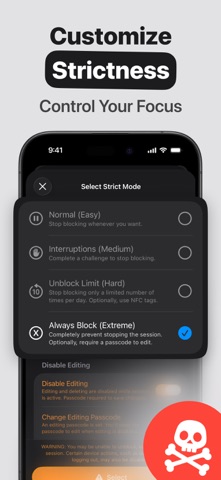

App Description
Refocus is an app blocker & website blocker that helps you limit screen time on apps!
Refocus is easy to use, yet has powerful screen time control features:
▶ Various ways to restrict or lock apps and block websites. Choose what helps you focus! Block any app or site — from social media and games to messaging and news.
▶ "Strict Mode" feature prevents you from unblocking. Set a passcode, or use an NFC tag, or wait a duration (ex. 30 seconds), or do a copy text challenge, or utilize Pomodoro (limit unblocking to 5 times per day, for 25 minutes each, with a 5-minute cooldown between each unblock).
▶ Block for a specific duration (ex. app timer for 30 minutes).
▶ Block at specific times (ex. every weekday from 9:00 AM to 5:00 PM).
▶ Set app limits (ex. after 10 minutes of using Instagram, block it). Set an app time limit!
▶ Hide Instagram Reels and YouTube Shorts in Safari.
▶ Block at the location you pick — whether it be home, work or school.
▶ View your daily, weekly and monthly Screen Time analytics. Use Refocus as a screen time tracker!
▶ Mac app that also lets you block apps and websites on macOS.
▶ And more!
---
Visit www.refocusapp.co for more information.
Terms of Use:
- https://refocusapp.co/terms-of-use