Forma: PDF Document Editor

Forma: PDF Document Editor Summary
Forma: PDF Document Editor is a free, ad-supported, with in-app purchases iOS app in Productivity by BPMobile. Released in Feb 2023 (3 years ago). It has 63K ratings with a 4.66★ (excellent) average. Based on AppGoblin estimates, it reaches roughly 145K monthly active users and generates around $10K+ monthly revenue (32% IAP / 68% ads). Store last updated Oct 23, 2026
Recent activity: 41 new ratings this week View trends →
SDK intelligence: AppGoblin detected 6 development tools(e.g. Google), 4 ad networks, 2 analytics: product, 1 analytics: attribution,and 1 business tools integrated into Forma: PDF Document Editor. View full SDK list →
Forma: PDF Document Editor SDKs Summary
Forma: PDF Document Editor was last scanned for SDKs on 2026-09-24. Below is the overview of third-party companies detected in the app. The full list of SDKs, permissions and unknowns is available here.
 Google
 Facebook
 AdMob
AdMob Snap
Snap Amazon
 Airbnb Engineering
 nanopb
 AppsFlyer
 Firebase
 Amplitude
 Qonversion
4.66★
Ratings: 63K
Screenshots


App Description
Meet Forma—your AI-powered PDF editor that lets you fill, sign, scan, and edit documents.
Contracts to sign, forms to fill, files to convert—and no laptop in sight. With Forma, all you need is your phone: edit text, fill out forms, add your signature, scan paper, and convert between formats without disrupting the layout. When a document needs more than editing—a summary, a rewrite, a draft from scratch—the built-in AI assistant will take care of that too.
From the creators of iScanner, trusted by 145M+ users.
With Forma, you get:
• A clean interface that keeps PDF work intuitive.
• A built-in scanner with OCR that turns paper into searchable, editable files.
• An AI assistant that summarizes, catches mistakes, and generates content.
• Secure cloud storage synced across iPhone, iPad, and web.
Here's what that looks like:
EDIT PDFs WITHOUT LOSING THE LAYOUT
Need to update a figure in a proposal or fix a heading before a deadline? Tap any text to edit it—Forma auto-matches fonts so the document looks untouched. You can also highlight sections, add notes, insert images, and split or merge files.
VIBE EDIT PDFs WITH A TEXT OR VOICE PROMPT
Instead of manually editing PDFs, let the app do the work. Tell Vibe Edit what you want to change by typing a message or recording a voice command, and get your updated PDF right away.
FILL & SIGN FORMS WITHOUT PRINTING
Tax form, lease, job application—complete any form right in the app. With autofill, you can speed through repetitive fields. Draw or type your electronic signature once, save it, and apply it whenever you need.
TURN PAPER DOCS INTO FILES
Not every document starts digital. Unlike most PDF editors, Forma has a full scanner built in—point your camera at an agreement, a receipt, or a note, and it becomes a clean, searchable PDF with OCR.
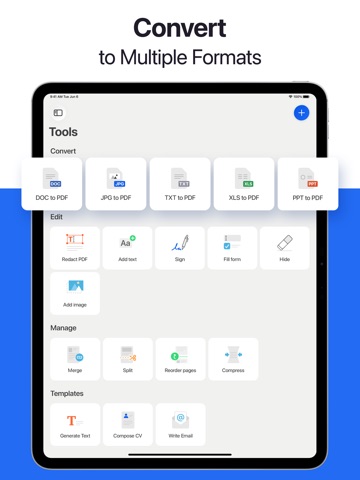
CONVERT FILES BETWEEN FORMATS
Client needs your PDF as a Word document? Professor wants the assignment in a different format? Convert seamlessly between PDF, Word, Excel, PowerPoint, JPG, and TXT in both directions.
LET AI DO THE HEAVY LIFTING
Long contract before a meeting? Email that needs a different tone? Summarize lengthy documents, rewrite and polish text, or catch grammar and logic mistakes. Plus, generate cover letters, emails, and more with ready-made templates.
CREATE AND SEND INVOICES ON THE GO
Project done, time to get paid. Add line i