Paraphrasing Texts

Paraphrasing Texts Summary
Paraphrasing Texts is a free iOS app in Productivity by Abdul Rehman. Released in Mar 2023 (3 years ago). It has 1.00 ratings with a 5.00★ (excellent) average. Based on AppGoblin estimates, it reaches roughly 4.00 monthly active users . Store last updated Dec 22, 2025
Paraphrasing Texts SDKs Summary
App not yet scanned for SDKs.
5★
Ratings: 1.00
Screenshots

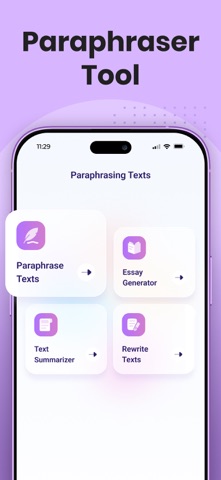

App Description
The Paraphraser app allows you to paraphrase content by using advanced AI technology.
This app allows you to perform a quick process of paraphrasing texts and gives you the option to copy the paraphrased text in real-time.
How to use the Paraphraser Texts app?
This paraphraser app is quite simple to use. Follow these instructions to get your paraphrased result.
• Type, paste or upload a file from local storage.
• Click on the “Paraphrase Texts” button.
• Copy or download the output using the shortcut buttons.
How does Paraphraser work?
This app uses advanced AI to paraphrase texts quickly. It has four paraphrasing modes, which means it has multiple algorithms working in the backend to generate different types of results.
Technologies like NLP and rephrasing algorithms work together in this app to paraphrase text effectively.
Features of Paraphrasing Texts App
This app comes with the following useful features:
• File Upload – Upload files from your device to paraphrase them.
• Four Paraphrasing Modes:
• Simple—best for changing words with their synonyms.
• Flux—can change phrases as well as words.
• Smart—smart paraphrasing with great results.
• Creative—the ultimate mode to boost engagement for your article.
• Bold Changes – all words and phrases that have been changed are bolded.
• Choose your own synonyms – tap on the bolded text to open a list of suitable synonyms and replace the altered words.
• Downloading Results – tap on the download button to save the output text to local storage.
Esta aplicación te permite realizar un proceso rápido de parafraseo de textos y te da la opción de copiar el texto parafraseado en tiempo real.
¿Cómo usar la aplicación Parafrasear Textos?
Esta app parafrasear es bastante sencilla de utilizar. Siga estas instrucciones para obtener su resultado parafraseado.
• Escriba, pegue o cargue un archivo desde el almacenamiento local.
• Haga clic en el botón “Parafrasear Textos”.
• Copie o descargue la salida utilizando los botones de acceso directo.
¿Cómo funciona el Parafrasear?
Esta aplicación de utiliza IA avanzada para parafrasear textos rápidamente. Tiene cuatro modos de paráfrasis, lo que significa que tiene múltiples algoritmos trabajando en el back-end para generar diferentes tipos de resultados.
Tecnologías como NLP y los algoritmos de reformulaci