DGArt
DGArt Summary
DGArt is a mobile iOS app in Art And Design by Heng Jia Liang. Released in Mar 2023 (3 years ago). It has 12 ratings with a 2.92★ (poor) average. Based on AppGoblin estimates, it reaches roughly 24 monthly active users . Store metadata: updated Nov 3, 2025.
Store info: Last updated on App Store on Nov 3, 2025 .
2.92★
Ratings: 12
Screenshots


App Description
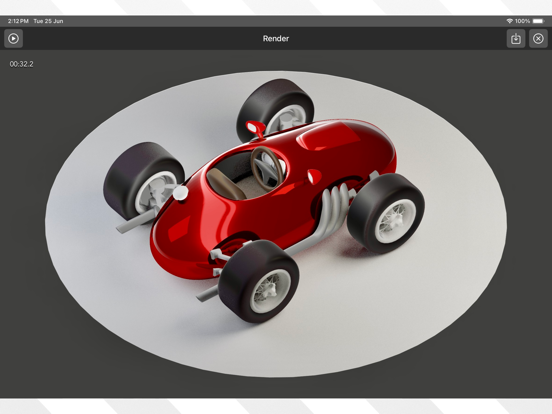
DGArt is a 3D modeling, animation, and rendering tool for artists, game designers, and developers to create 3D assets and content from start to finish. It is affordable, comprehensive, and easy to learn. With DGArt on your iPad, you can easily construct 3D models, animate them, and create digital art.
DGArt provides a variety of basic geometric primitives, including extra/custom polygons. It features an edit mode with tools like extrusion, inset, knife cuts, and more.
Animation System:
DGArt now includes animation features, allowing users to create movement, rotation, and scaling animations. The animation timeline supports keyframe-based animation with easing options, making it easy to create smooth transitions. You can preview and render animations directly within the app.
DGArt creates a .scn file, which stores geometry, nodes, lights, cameras, and animation data. This format can be used in the Playgrounds App for your apps or games.
Please refer to SceneKit for more details.
Main Features:
• 3D Scene Editor
• Polygon Modeler Mode
• Animation Timeline & Keyframe Support
• Render Beautiful Images & Animations
• Layer, Object, Material, Light & Camera Property Panels
• Global Environment Settings
• Image Library
• Works Great with Apple Pencil
• Physically-Based Rendering (PBR) Support
• Save Scene in .scn [SceneKit] Format
• Export to .usdz / .obj Format
• Native App with Small Size
3D Scene Editor:
• Select, Move, Rotate, and Scale tools
• Reset object to center or ground
• Clone objects with Array, Radial, Random, and Points Cloning
• Add objects like basic shapes, editable polygons, text, nodes, lights, and cameras
• Light types: Ambient (No Shadow), Area, Omni, Spot, Directional
• Add Perspective or Orthographic Camera
Animation Features:
• Animation Timeline & Keyframe System
• Animate movement, rotation, scaling, visibility
• Animate morph for object
• Animate light intensity and color
• Easing options for smooth transitions
• Preview & Render Animations
Scene Navigation:
• Standard pinch-to-zoom & two-finger pan
• Top, Right, Front, and Perspective preview windows
• Long press to switch between Top and Bottom views, Right and Left views, and Perspective and Orthographic views
• Reset View, Frame Object, and Frame All Objects buttons
Layer Panel:
• Hide/Unhide & Delete objects
• Paren