MIDI Bagpipes Control Surface
MIDI Bagpipes Control Surface Summary
MIDI Bagpipes Control Surface is a mobile iOS app in Music And Audio by Michael Eskin. Released in Apr 2010 (16 years ago). It has 3.00 ratings with a 1.67★ (poor) average. Based on AppGoblin estimates, it reaches roughly 4.00 monthly active users . Store metadata: updated Jul 4, 2025.
Store info: Last updated on App Store on Jul 4, 2025 .
1.67★
Ratings: 3.00
Screenshots

App Description
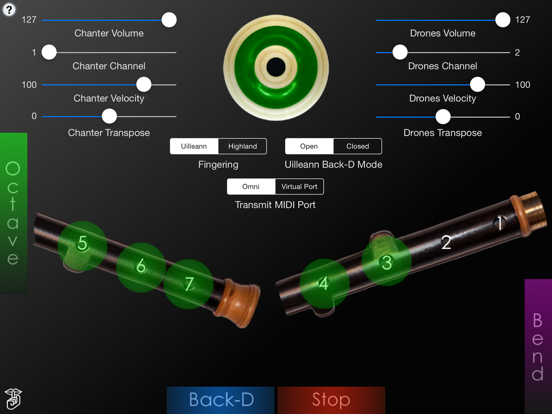
This app is a Irish/Scottish Bagpipes fingering based MIDI control surface for the iPad that can be used to play your hardware MIDI synthesizer/sampler modules or other MIDI apps.
The chanter fingerings are based on either those used for the Irish Uilleann or Scottish Highland bagpipes.
The app doesn't produce any sound on its own, it is designed for playing hardware and software VST-style MIDI synthesizers via a CoreMIDI compatible interface connected to the dock connector or virtual MIDI instruments like Roland Sound Canvas for iOS, Universal Piper, or Sonosaurus ThumbJam running on your iPad.
The app supports sending data on two independent MIDI channels, one for the chanter and the other for the drones.
IMPORTANT: Since this app requires as many as 9 fingers on the screen at the same time, before playing, disable "Multitasking Gestures" on your iPad (in the iPad Settings app, under the General section, turn the Multitasking Gestures switch to the off position).
Choose between Uilleann and Highland chanter fingerings using the selector below the drone puck.
Touch the '?' on the upper left corner for the on-screen help labels.
For Uilleann fingerings, you can choose whether the back-D note plays when the Back-D switch is touched (Open mode) or released (Closed mode). Closed mode matches the real Uilleann chanter.
Touch the drone puck to start/stop the drones. For the Highland pipes, you'll want to set the drone transposition two semitones higher than the chanter
Using Uilleann Chanter Fingering
To play the chanter, touch the three holes of the left side of the chanter starting with the tips of your left index, middle, and ring fingers.
Next, touch the four holes on the right side of the chanter with the tips of your right index, middle, ring, and little fingers.
Touch the green "Octave" bar on the left side with your left little finger to play the notes one octave higher.
Optional finger vibrato may be done by touching holes below the main closed holes used for a note.
Using Highland Chanter Fingering
Touch the bar at the bottom of the screen with your left thumb. It represents the hole on the back of the chanter for the highest note and must be covered for other lower notes to play.
The app uses chanter fingerings based on those for the Highland pipes.
Next, touch the left half of the chanter starting with the tips of your left index, mid