PrinterShare Premium

PrinterShare Premium Summary
PrinterShare Premium is a mobile iOS app in Productivity by Dynamix Software. Released in May 2010 (16 years ago). It has 44 ratings with a 4.71★ (excellent) average. Based on AppGoblin estimates, it reaches roughly 498 monthly active users . Store last updated Jul 15, 2026
PrinterShare Premium SDKs Summary
App not yet scanned for SDKs.
4.71★
Ratings: 44
Screenshots



App Description
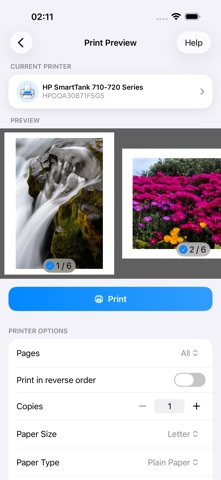
Print photos, PDFs, documents, web pages and contacts straight from your iPhone or iPad – no computer required. Or turn any Mac or PC-connected printer wireless and reachable from anywhere in the world with PrinterShare Desktop app.
Pick what you want to print inside the app, or send it from any other app with the Share button.
WHAT YOU CAN PRINT
- Photos and images
- PDF files and documents
- Web pages
- Contacts
- Markdown and text files
- Content copied to clipboard (using Paste to Print)
- Content shared from other apps via the Share menu
HOW YOU CAN PRINT
- Wi-Fi (using a Wi-Fi Direct printer or using a Wi-Fi router as a middleman)
- AirPrint
- Save as PDF
- PC or Mac (if your printer is shared using PrinterShare desktop client)
- The Internet
WORKS WITH THOUSANDS OF PRINTERS
PrinterShare supports thousands of models from HP, Canon, Epson, Brother, Samsung, Xerox, Lexmark, Ricoh and many more brands. Most Wi-Fi printers are detected automatically. If your exact model isn't explicitly supported, the app suggests a driver that's likely to work.
Don't see your printer? You can still print through the free PrinterShare desktop app. As long as the printer works from a Windows or Mac computer on the same Wi-Fi network, PrinterShare can print to it. Just install the PrinterShare Desktop app from printershare.net and the app finds shared printers automatically.
NO ADS, NO IN-APPS
PrinterShare Premium gives you access to full functionality. One time purchase. Yours forever.
You also get complimentary 100 pages for printing over the internet.
PRINT FROM ANYWHERE
Print to a printer located anywhere in the world over the internet. This needs the PrinterShare Desktop app installed on the computer at the receiving end. Also, logging into the same PrinterShare account in the mobile app and in the desktop app.
For remote printing, you get 100 complimentary pages to your PrinterShare account when you unlock premium in the mobile app.
MORE INFO
Please, visit printershare.net for help and more details.
You can read the Terms of Use here: https://printershare.net/terms.php