Extreme Calendar
Extreme Calendar Summary
Extreme Calendar is a with in-app purchases iOS app in Business by Birdsoft LLC. Released in Apr 2011 (15 years ago). It has 37 ratings with a 4.38★ (good) average. Based on AppGoblin estimates, it reaches roughly 208 monthly active users and generates around $<10K monthly revenue (100% IAP / 0% ads). Store metadata: updated Feb 3, 2024.
Store info: Last updated on App Store on Feb 3, 2024 .
4.38★
Ratings: 37
Screenshots

App Description
One of the most powerful calendars on iOS. Advanced views with plenty of options all designed for speed and flexibility.
You wont get this much information at a glance from any other calendar, and adding events in-line allows you to get in and out and on with your busy day.
Based on Extreme Agenda, it gives you the powerful calendar based views you want at a low price, and allows you to purchase the other features of the full Organizer once you need them.
Features Include:
Great Calendaring
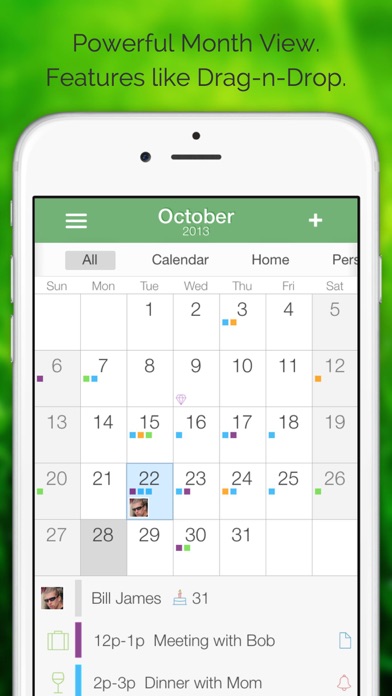
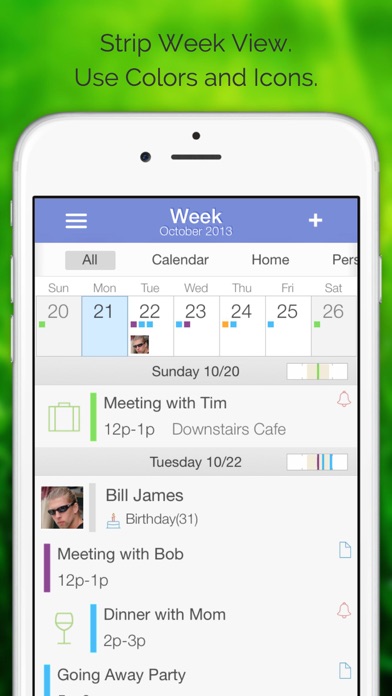
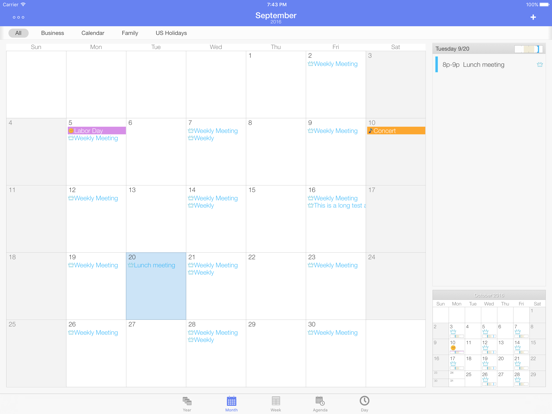
• Powerful views including Year, Month, Week, Upcoming Agenda List, and Day.
• Pull Birthdays and Anniversaries from your contacts with pictures.
• Advanced repeating event options.
• Move/Copy Events
• Military time, ISO week, and week start options.
• Uses and expands on your native calendar data.
• Sync like you would with the default calendar(Google, iCloud, Exchange).
• Next month preview option on Month View
• Uses time bars and icons to keep you informed at a glance
• Put event text right on calendar
• Filter events based on iCal calendars.
• Almost 200 professional icons to mark your events
• Natural Language Entry
• Event Templates
• Email Events
• Drag-n-Drop Events
Power and Flexibility
• Universal Support
• TextExpander Support
• Portrait and Landscape Support.
• Retina and iPhone 5 Display Support.
• Background and color theme choices.
• Help System
• Easily upgraded to Extreme Agenda Planner
---------------------------------------
InApp Purchase
When you are ready to upgrade just pay the difference and your Extreme Calendar becomes Extreme Agenda. Doing so adds powerful contact, task, note, and list views along with search, weather, private filtering, a status coloring choice, and over 800 more icons. And it adds categories for coloring, icons, and advanced filtering.
Otherwise if you want it all now, look for 'Extreme Agenda' in the AppStore.
-------------------------------------
Interface
You can tap-h-hold in the main calendar days and in the time area of the timeline day view for an 'add and paste' toolbar. Copy/Move, used with the paste, are in the toolbar on each event in timeline day.
-------------------------------------
Tech Support / Reviews
Please email us with feature suggestions, bug reports, or you can't figure something out instead of using the reviews i