Meetings - Notebooks for Work - Meeting Notes, Agendas, and Minutes

Meetings - Notebooks for Work - Meeting Notes, Agendas, and Minutes Summary
Meetings - Notebooks for Work - Meeting Notes, Agendas, and Minutes is a with in-app purchases iOS app in Productivity by Steven Romej. Released in Nov 2011 (14 years ago). It has 33 ratings with a 4.39★ (good) average. Store metadata: updated Jan 12, 2015.
Store info: Last updated on App Store on Jan 12, 2015 .
4.39★
Ratings: 33
Screenshots

App Description
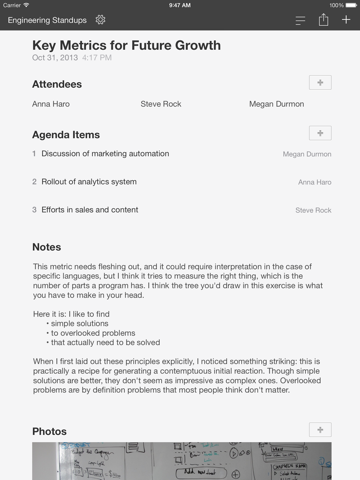
Meetings helps you create structured meeting notes that are consistent, clear, and fully searchable. Note who was there, what was said, and what needs to happen next. Imagine holding a record of key decisions over the past year in your hand.
RECORD, RETAIN, AND RECALL
Give your meeting notes a title, adjust the date and time, add attendees, and create action items. You can pick the things you need for each document you create. Everything is searchable so you can later find meetings that mention 'deliverables' or 'hiring' or just those that 'Emma Avery' attended.
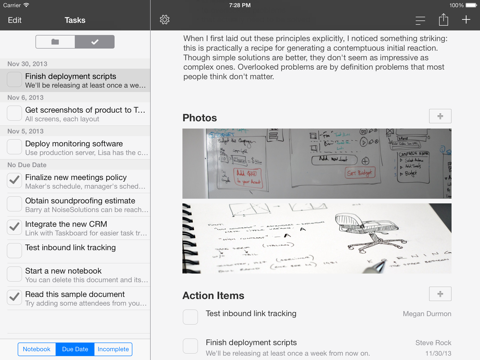
Capture whiteboard or presentation images within the app, or add your own from the photo picker.
HE SAID, SHE SAID
Add attendees from your address book. While typing notes you can access and insert attendee names directly into the document with a tap.
NEXT STEPS
You can create a list of action items so you'll know what needs to happen before the next meeting. If you need to, add a due date or notes to each task. You can also assign an attendee (or someone else) to the action item so that you'll remember who's responsible.
NOTEBOOKS FOR WORK
Your notes are written in notebooks that you can rename and reorder. This makes creating a notebook for each project, client, department, or key issues easy.
SHARE WITH THE TEAM
Email or print a copy of your notes. There's a button to send-to-all-attendees if you need it. Draft an agenda, add attendees, and email it to them prior to the meeting. Afterward, you can send everyone a copy of the meeting minutes and action items.
You can also create a Calendar event for the meeting from within the app.
SIMPLE BY DEFAULT
A new meeting document starts with a title and your notes. Show or hide content sections as you need. If all you want is notes, hide the title. If you need to add attendees or a section with tasks you can.
MAKE A GOOD IMPRESSION
Maybe it's your job to take detailed notes, or maybe you're organized. Having a record to refer to and send out will help you get the recognition you deserve.
WASTE LESS TIME
Structured notes help you focus on key decisions and actionable next steps. If you find it difficult to distill a meeting into anything of substance you'll at least be able to make helping the team do better next time a goal.
FEATURES
* Multiple notebooks to keep notes organized
* Notes documents can have a title, attendees, notes, and/or action items
* Show or hide sections to tailor a set of notes to your needs
* Add photos from your library or take one within the app
* Add meeting attendees from your address book
*