FE File Explorer

FE File Explorer Summary
FE File Explorer is a mobile iOS app in Tools by Skyjos Co., Ltd.. Released in Feb 2012 (14 years ago). It has 36K ratings with a 4.69★ (excellent) average. Based on AppGoblin estimates, it reaches roughly 94K monthly active users . Store last updated Aug 28, 2026
Recent activity: 4.00 new ratings this week View trends →
FE File Explorer SDKs Summary
App not yet scanned for SDKs.
4.69★
Ratings: 36K
Screenshots



App Description
FE File Explorer is a file manager app on your iPhone and iPad. It can access not only local files, but also files on your computer, NAS and cloud storages. Transfer files among those locations. Stream movies and music to your iPhone/iPad. Directly view and manage documents, photos, files on your computer and cloud without downloading to your iPhone/iPad.
FEATURES:
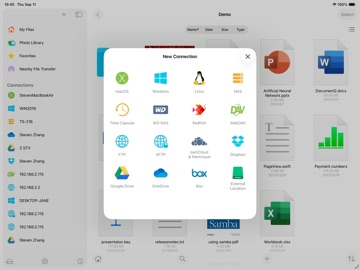
* Access network shares on macOS, Windows, Linux, Time Capsule, NAS via SMB/CIFS protocol.
* Access WebDAV Server, FTP Server and SFTP Server
* Access cloud storages: Google Drive, Dropbox, OneDrive, Box.
* Automatically discover comptuers, NAS and servers when you setup new connections.
* View, copy, move, rename and delete your files right on iPhone/iPad.
* Stream movies and musics from network shares and cloud storages to iPhone/iPad.
* AirPlay photos, musics and movies on Apple TV.
* Sort and search files
* Archive and unarchive files
* Dark Mode
* Multiple windows on iPad
* Integrated with iOS Files app
* Distribute configurations via MDM (Mobile Device Management).
* Built-in FTP Server and HTTP Server
* File Transfer:
Copy files among servers, cloud storages, iPhone and iPad.
Transfer files by drag and drop.
Nearby file transfer: Directly transfer files between two nearby iOS devices.
===== CONTACT US =====
Email: support@skyjos.com
Twitter: @SkyjosApps
Facebook: @SkyjosApp