Bazaart AI Photo Editor Design

Bazaart AI Photo Editor Design Summary
Bazaart AI Photo Editor Design is a free, ad-supported, with in-app purchases iOS app in Photo And Video by Bazaart Ltd.. Released in Apr 2012 (14 years ago). It has 620K ratings with a 4.80★ (excellent) average. Based on AppGoblin estimates, it reaches roughly 291K monthly active users and generates around $10K+ monthly revenue (34% IAP / 66% ads). Store last updated Sep 26, 2026
Recent activity: 137 new ratings this week View trends →
SDK intelligence: AppGoblin detected 6 development tools(e.g. Google), 3 ad networks, 2 analytics: product,and 1 analytics: attribution integrated into Bazaart AI Photo Editor Design. View full SDK list →
Bazaart AI Photo Editor Design SDKs Summary
Bazaart AI Photo Editor Design was last scanned for SDKs on 2026-10-02. Below is the overview of third-party companies detected in the app. The full list of SDKs, permissions and unknowns is available here.
 Google
 Facebook
 One Signal
 Airbnb Engineering
 nanopb
 Alamofire
 AppsFlyer
 Firebase
 Amplitude
4.8★
Ratings: 620K
Screenshots


App Description
Bazaart is an easy-to-use AI photo editor, video editor, and design app. No design background needed. Create fast for online selling, digital marketing, and social media. Get your design superpowers today!
What you can make
For your business:
Product photos, model shots, home listings, profile pics, logos, flyers, ads, posters.
For your social media:
Reels, TikTok videos, stories, posts, slideshows, thumbnails, stop motion videos.
For your everyday life:
Collages, cards, invitations, memes, WhatsApp stickers, backgrounds, wallpapers, GIFs, works of art.
AI tools
• Edit with AI: change or replace anything in a photo with simple prompts
• Remove background: background remover for photos and videos
• Remove: remove objects and people from any photo
• AI models: create on-model product shots
• AI video: turn product photos into videos
• Magic Background: create on-brand, AI-generated scenes for products and portraits
• AI Image: turn text prompts into images
• AI Restyle: restyle photos in one tap (from product try-ons to creative looks)
• Magic Edit: select an area and replace it using a prompt
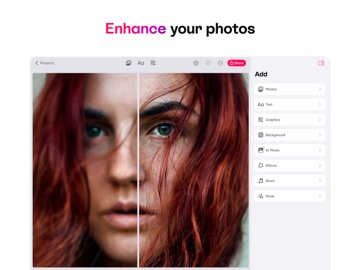
• Enhance: improve photo quality in a tap
• Expand: extend your photos to any size
• Lift: cut the subject from the background, move and resize it
Photo and video editing tools
• Cut out with crop, scissors, eraser, and shape cut-out
• Adjust exposure, contrast, saturation, vibrance, warmth, tint, shadows, highlights, fade, sharpness, and blur
• Make elements stand out with outlines and shadows
• Combine photos and videos with blending modes
• Batch edit to speed through multiple photos
• Blur background of any photo for a portrait look
Design tools
• Create in custom sizes and popular presets
• Sketch and draw freely
• Curve text on arcs and circles
• Style text with quick presets
• Fine-tune text alignment, letter spacing, and line spacing
• Auto-snapping for perfect alignment
• Nudge tool for precise positioning
• Work with layers; every change is reversible
• Organize projects into folders
• Save projects to the cloud to keep them in sync
Content that speeds you up
• Beautiful templates made by designers
• Thousands of backgrounds, graphics, shapes, and animated graphics
• Photo and video effects
• Large font library, plus add your own
• Use photos and videos from albums, camera, files, or sto