Clocket: Time Clock Work Hours

Clocket: Time Clock Work Hours Summary
Clocket: Time Clock Work Hours is a free, with in-app purchases iOS app in Business by Brogan LLC. Released in Jun 2012 (14 years ago). It has 7.7K ratings with a 4.60★ (excellent) average. Based on AppGoblin estimates, it reaches roughly 35K monthly active users and generates around $<10K monthly revenue (100% IAP / 0% ads). Store last updated Aug 26, 2026
Recent activity: 2.00 new ratings this week View trends →
Clocket: Time Clock Work Hours SDKs Summary
App not yet scanned for SDKs.
4.6★
Ratings: 7.7K
Screenshots


App Description
Clocket makes tracking work hours simple. Built for hourly workers, freelancers, and anyone who needs accurate timesheets and earnings calculations.
TRACK YOUR TIME
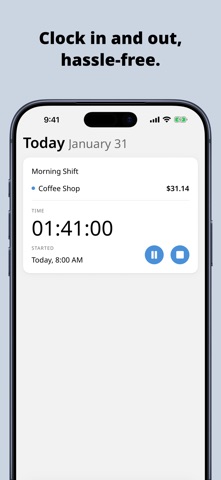
• Start a timer or add entries manually — past, present, or future
• Log breaks, tips, and notes with every entry
• See your earnings grow in real time as you work
STAY ORGANIZED
• Create color-coded jobs with hourly rates and pay periods
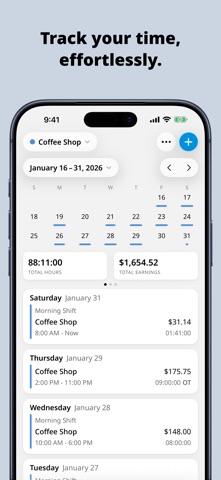
• View entries by day, week, month, or pay period
• Entries display in a calendar with a detailed list below
GET PAID ACCURATELY
• Configure daily and weekly overtime with custom multipliers
• Round time automatically — start/end times or total duration
• Support for weekly, bi-weekly, semi-monthly, monthly, and 4-week pay periods
NEVER FORGET TO CLOCK IN
• Schedule reminders for specific times
• Get notified when arriving or leaving a location
• Set clock-out reminders after working a set duration
UNDERSTAND YOUR TIME
• Visual reports break down hours and earnings by job or period
• Export timesheets as PDF, CSV, HTML, or plain text
• Share via email, messages, or save to any app
MAKE IT YOURS
• Choose from a variety of app icons
• Customize duration formats and first day of week
• Add the active timer widget to your home screen
Download Clocket and take control of your time.
-----
Privacy Policy: https://www.clocket.com/privacy
Terms and Conditions: https://www.clocket.com/terms