Yomu EBook Reader

Yomu EBook Reader Summary
Yomu EBook Reader is a free, with in-app purchases iOS app in Books And Reference by Beat Raess. Released in Jan 2013 (13 years ago). It has 5.7K ratings with a 4.72★ (excellent) average. Based on AppGoblin estimates, it reaches roughly 19K monthly active users and generates around $<10K monthly revenue (100% IAP / 0% ads). Store last updated Sep 20, 2026
Recent activity: 4.00 new ratings this week View trends →
SDK intelligence: AppGoblin detected 1 business tools(e.g. Bugsnag) integrated into Yomu EBook Reader. View full SDK list →
Yomu EBook Reader SDKs Summary
Yomu EBook Reader was last scanned for SDKs on 2026-08-24. Below is the overview of third-party companies detected in the app. The full list of SDKs, permissions and unknowns is available here.
 Bugsnag
4.72★
Ratings: 5.7K
Screenshots



App Description
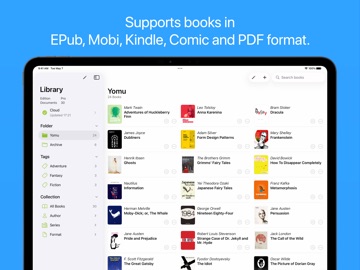
Yomu is an independent reader for book lovers. Yomu’s design is carefully crafted for ebooks and offers custom styles for better readability and distraction-free reading.
Designed to let you focus on reading, Yomu has no unnecessary preferences. Just open a book and start reading. Yomu’s fluid layout dynamically adjusts all text properties and margins depending on your preferred styles and device, giving you an optimal reading experience.
FORMATS
Yomu supports standard ebooks without digital rights management.
Supported formats:
- EPub (.epub)
- Mobi (.mobi, .prc)
- Kindle (.azw, .azw3, .kf8)
- Comics (.cbz, .cbr)
- PDF (.pdf)
Choose free books from publishers such as Standard Ebooks or Project Gutenberg. Download ebooks directly from your browser or copy files from other apps. Import files with iCloud Drive, iTunes File Sharing, or from Dropbox, Google Drive, OneDrive, OPDS and Calibre.
READER
The reader's design is carefully crafted for ebooks and offers custom styles for better readability.
Choose your favorite theme font (Lato, Georgia, Lexend, OpenDyslexic, ...), reader mode (day, sepia, grey, black, ...), select a preset or custom font size, content layout (page, scroll) and many more options. All settings can be saved as your personal default for each book.
Swipe or tap to go to the next page. You can also use the book's content outline or table of contents to navigate to another chapter.
While reading EPub, Mobi and Kindle books, select text to take notes or highlight favorite sections. Create bookmarks or search inside ebooks to quickly find anything you are looking for.
LIBRARY
Organise your books in an easy to use library.
Manage your library by creating folders or tags to organize your books. Sort your collection either by title, author, series, recently read or drag and drop for a custom order.
You can edit a document's title, author, summary, cover or any other meta data. Save or export your books with all information and annotations in text, markdown or json format.
CLOUD
Yomu's Cloud Library (pro only) stores your books and annotations securely in Apple's iCloud.
Keep all your ebooks safe and at hand on whatever device. Every time you change something on one device, it's synced to all your other devices. Always have the latest version, when you start reading on your iPad and continue on your iPhone on the go.
Please note th