Photo Time Lock - Time Delay Image Lock

Photo Time Lock - Time Delay Image Lock Summary
Photo Time Lock - Time Delay Image Lock is a mobile iOS app in Tools by Falcon In Motion LLC. Released in Oct 2012 (13 years ago). It has 18 ratings with a 4.22★ (good) average. Based on AppGoblin estimates, it reaches roughly 56 monthly active users . Store metadata: updated Apr 14, 2017.
Store info: Last updated on App Store on Apr 14, 2017 .
4.22★
Ratings: 18
Screenshots
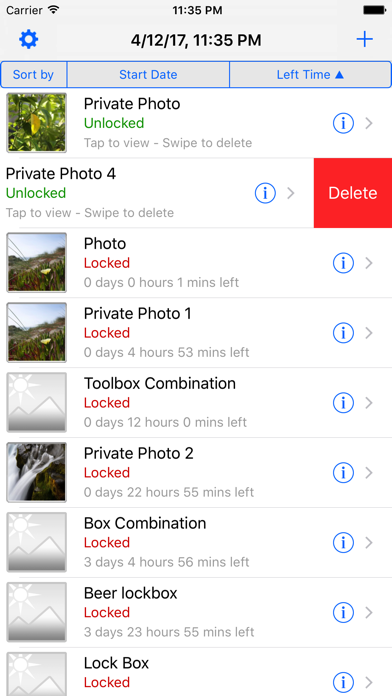
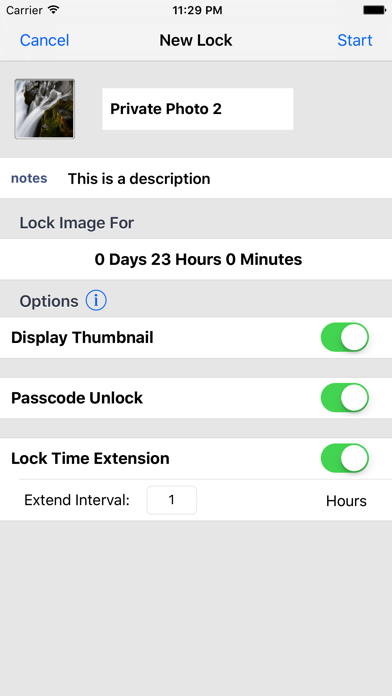
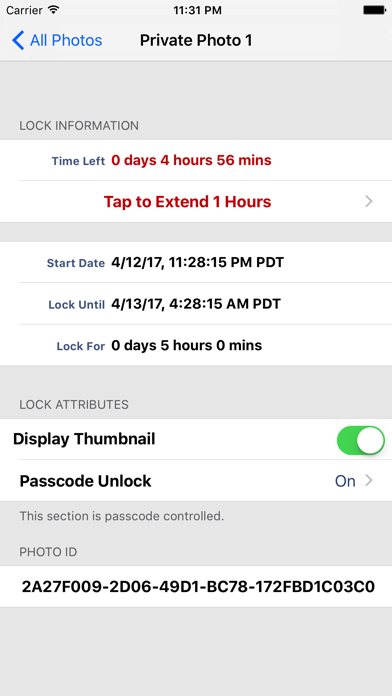
App Description
The only time-delay controlled Photo Lock app is now available on App store. Support iPhone 5 & iOS 6.0
What is Photo Time Lock?
Using a secure, timer-locking feature, this app is the instinctive, intuitive, desired, and repeatable ability of an individual to voluntarily lock up anything (via photos contain combination of a lock), for any amount of time he or she selects, from 1 minutes to 365 days; items that are damaging to her health, or a threat to his very life.
Scenarios:
Gambling: An individual who knows that he has a gambling problem places all the “tools” of gambling (e.g. cash, checkbooks, credit cards, etc.) in a combination lockable container, scramble the combination and took a picture of the code via this app, and set a timer to lock this picture for 48 hours. Then he knows he will be out of gambling in the following two days.
Beer: A beer drinker buys a case of beer, 24 cans. At home, he puts 3 beers on the top shelf of the refrigerator and 21 in a combination lockable container. He locks the container and put it on the bottom shelf of the refrigerator. He takes a picture of the randomly scramble combination via this app, and sets the timer-lock for 24 hours. Later in the day, could he go out and buy more beer? Yes, but a high percentage of individuals do not. Try it for yourself.
Features:
SECURE: The time of this app is verified via remote NTP server, thus tampering system time on the device will have absolutely no effect.
KEYHOLDER UNLOCK: a keyholder who has the passcode can unlock any individual photo anytime even the countdown timer has not been reached zero.
FLEXIBILITY: The lock time can be set from 1 minute to 365 days, in a minute interval.
How to use it?
1. You may need a box that can be locked with a combination lock, and you should be able to randomly scramble the lock setting without looking it (or let your beloved one do it for you).
2. Run this app, create a new photo lock, and then take a picture of the combination lock without actually read the combination, you can look at a thumbnail of the picture to assure yourself you’ve got a decent picture, but the thumbnail doesn’t give enough resolution to see the combination.
3. Set a lock time from 1 minutes to 365 days, in one minute interval, you can also turn on “Keyholder Unlock” feature thus the keyholder can unlock this photo anytime by enter