Best Budget Pro for iPad

Best Budget Pro for iPad Summary
Best Budget Pro for iPad is a with in-app purchases iOS app in Finance by 倩 赵. Released in Dec 2012 (13 years ago). It has 50 ratings with a 4.35★ (good) average. Based on AppGoblin estimates, it reaches roughly 523 monthly active users and generates around $<10K monthly revenue (100% IAP / 0% ads). Store last updated Aug 7, 2023
Best Budget Pro for iPad SDKs Summary
App not yet scanned for SDKs.
4.35★
Ratings: 50
Screenshots
App Description
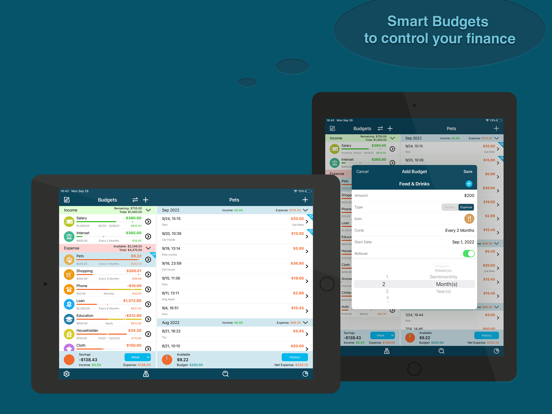
Best Budget is an easy to use app to help you keep to a budget, as a personal finance application, you can create unlimited income and expense budgets with or without recurring, and track the transitions of each budget.
With Best Budget, you can check your income and expense at a glance, and monitor which transactions are going on a budget. Best Budget is help you to become your own financial expert.
Features:
⁃ Create unlimited expense or income budgets.
⁃ Set budget name, amount, type, category, date range and if no cycle or cycle by a specific date range etc.
⁃ Set if budget available amount is rollover or not.
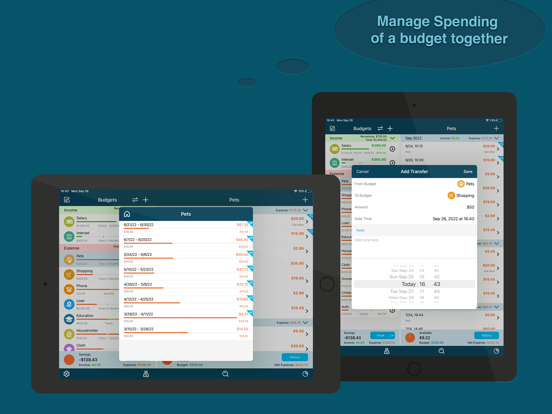
⁃ Transfer available amount from one budget to another.
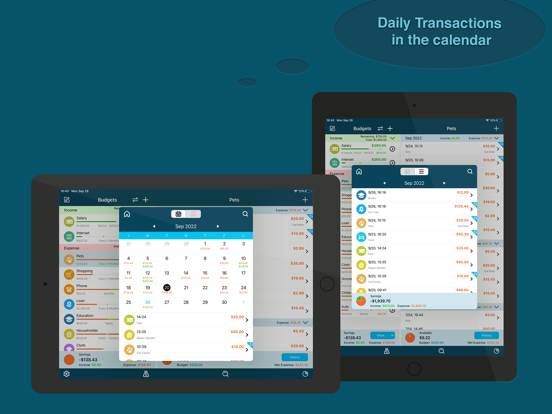
⁃ Add transactions to each budget.
⁃ View history of past circular budget.
⁃ Custom reminders to help you manage budgets.
⁃ Report to show your income and expense proportion of a date range.
⁃ Report to show percentage of each budget of a date range.
⁃ Export your budgets in form of HTML, CSV or PDF.
⁃ Custom date range of budgets to be exported.
⁃ Search transactions by name, amount and note.
⁃ Passcode protection.
⁃ Supports Touch ID/Face ID passcode.
⁃ Clean and tidy user interface.
⁃ Supports AirPrint.
⁃ Supports WiFi backup & restore.
⁃ Supports Dropbox backup and restore.
⁃ Supports iCloud backup & restore.
If you have any question or suggestion, please email to maxwellapp@tom.com.