Microsoft PowerPoint

Microsoft PowerPoint Summary
Microsoft PowerPoint is a free, with in-app purchases iOS app in Productivity by Microsoft Corporation. Released in Mar 2014 (12 years ago). It has 2.9M ratings with a 4.67★ (excellent) average. Based on AppGoblin estimates, it reaches roughly 7.7M monthly active users and generates around $200K+ monthly revenue (100% IAP / 0% ads). Store last updated Oct 5, 2026
Recent activity: 6.3K new ratings this week View trends →
SDK intelligence: AppGoblin detected 1 development tools(e.g. Microsoft) integrated into Microsoft PowerPoint. View full SDK list →
Microsoft PowerPoint SDKs Summary
Microsoft PowerPoint was last scanned for SDKs on 2026-07-26. Below is the overview of third-party companies detected in the app. The full list of SDKs, permissions and unknowns is available here.
 Microsoft
4.67★
Ratings: 2.9M
Screenshots



App Description
Create, edit, view, present and share presentations with ease, whether you're on your phone or switching between devices.
Quickly access your recent presentations and slides across all your devices. OneDrive syncing keeps your work up to date, so you can start on your PC and continue editing on mobile without worrying about version conflicts.
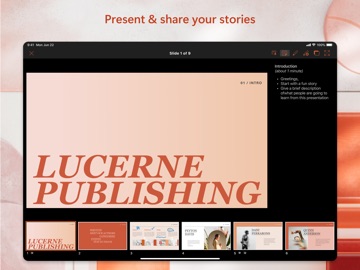
Make an impact with customizable, professional-looking slides. Use templates and design ideas to build polished presentations fast. Present confidently with Presenter Coach, an AI tool that offers real time suggestions to help you improve your pace, reduce filler words and speak naturally. (Microsoft 365 subscription required.)
Collaborate in real time – share presentations with one tap, see who’s working with you, manage permissions and track comments and changes as your deck evolves.
Get more done with Copilot – your built in AI assistant for PowerPoint.*
• Summarize lengthy presentation decks
• Get suggested Q&As to prep for meetings
• Research a topic using Copilot Chat
Present with Confidence
• Create or continue presentations on the go
• Seamless OneDrive syncing across devices
• Practice with Presenter Coach for personalized feedback
Customizable Slideshow Maker
• Start from templates or build slides from scratch
• Powerful editing tools help your work stand out
Collaborate on Presentations
• Invite others to edit or review with one click sharing
• Manage access and see who’s active in your deck
• View comments and compare changes over time
Requirements
• 1 GB RAM or above
*Unlock the full Microsoft 365 experience with a qualifying Microsoft 365 subscription for your phone, tablet, PC or Mac.
Microsoft 365 subscriptions purchased in app are billed to your App Store account and auto renew unless disabled in account settings. Subscriptions cannot be cancelled during the active period.
This app may be provided by Microsoft or a third party publisher and is subject to its own privacy statement and terms. Data may be transferred to or stored in the United States or other regions where Microsoft or its service providers operate.
EULA: http://aka.ms/eula