Piano eTutor: learn piano

Piano eTutor: learn piano Summary
Piano eTutor: learn piano is a ad-supported, with in-app purchases iOS app in Education by TRAN PHUONG. Released in Jan 2013 (13 years ago). It has 6.00 ratings with a 1.67★ (poor) average. Based on AppGoblin estimates, it reaches roughly 7.00 monthly active users and generates around $<10K monthly revenue (22% IAP / 78% ads). Store metadata: updated Mar 27, 2026.
Store info: Last updated on App Store on Mar 27, 2026 .
1.67★
Ratings: 6.00
Screenshots




App Description
MULTIPLE-PLATFORM INTERACTIVE PIANO LEARNING APP FOR STUDENTS & TEACHERS.
"Piano eTutor" is a multiple-platform (mobile & laptop) piano learning app that introduces a totally new approach to piano learning which is completely technology-oriented. The common problems with learning piano have been solved in an intuitive and user-friendly way, thanks to the technologies that the app has tried to make the most of. You don't need to read a lot of theory to start playing. Just read a few lines of summary and interact immediately with the exercises, then you'll easily understand what you need to know. With the help of technology, not much explanation is required in order to demonstrate a musical concept.
Compared to other traditional self-study methods, the app provides you with two things that other methods don't have, which are INTERACTION and MUSICAL TOOLS.
* INTERACTION:
- The app can listen to you while you're playing and IMMEDIATELY respond to what you play on the piano: it checks whether the notes you're playing are correct or not, in terms of pitch and timing, then shows you the next notes to play. In this way, you can learn to play note by note, one hand at a time, then combine two hands to play the whole song at the right speed.
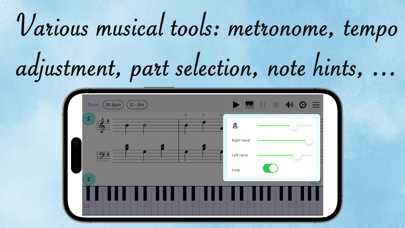
* MUSICAL TOOLS:
- Playback tool: You can listen to an exercise before practice, to analyze the structure, rhythm, note positions, ...
- Tempo-adjustment tool: You can adjust the tempo (speed) of the exercise to the value that you feel comfortable with. This helps you start practicing at a slow speed, then gradually increase the playing speed.
- Metronome tool: This tool helps you understand and develop the sense of beats, the rhythmic aspect of music. In addition, it also helps you play in the correct timing, which is an extremely important skill in music.
- Part-selection tool: In an exercise, there can be easy parts as well as difficult ones. You can just select the parts that you think you need to work on to start practicing.
- Note-hint tool: If you find it difficult to identify the position of a note, or the note positions of a chord, you can choose to show hints when practicing, then the app will show you where the notes are located on the keyboard.
In addition, there're TWO EXCLUSIVE FEATURES that you won't find in most other piano learning apps. Piano eTutor is built upon the sheet music processing technology that