TP-Link Tether

TP-Link Tether Summary
TP-Link Tether is a free, with in-app purchases iOS app in Tools by TP-Link Systems Inc.. Released in May 2013 (13 years ago). It has 628K ratings with a 4.78★ (excellent) average. Based on AppGoblin estimates, it reaches roughly 1.7M monthly active users and generates around $50K+ monthly revenue (100% IAP / 0% ads). Store last updated Sep 24, 2026
Recent activity: 964 new ratings this week View trends →
SDK intelligence: AppGoblin detected 5 development tools(e.g. Google),and 1 analytics: product integrated into TP-Link Tether. View full SDK list →
TP-Link Tether SDKs Summary
TP-Link Tether was last scanned for SDKs on 2026-10-02. Below is the overview of third-party companies detected in the app. The full list of SDKs, permissions and unknowns is available here.
 Google
 nanopb
 Alamofire
 SDWebImage
 Firebase
4.78★
Ratings: 628K
Screenshots


App Description
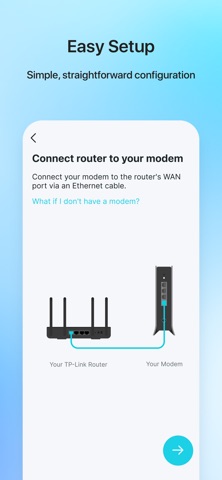
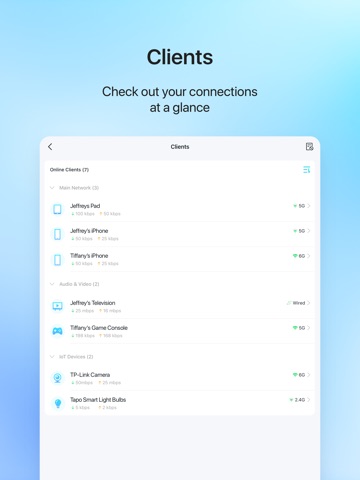
TP-Link Tether provides the easiest way to access and manage your TP-Link Router/ xDSL Router/ Range Extender with your mobile devices. From quick setup to parental controls, Tether provides a simple, intuitive user interface to see your device status, online client devices and their privileges.
- Setup SSID, password and Internet or VDSL/ADSL settings of your devices
- Block unauthorized users who are accessing your devices
- Manage permissions of client devices
- Parental control function with schedule and URL-based Internet access management
- Find the best location to place your range extender
- Automatically turn off the LEDs at specific time
- Manage most of TP-Link devices simultaneously
View compatible routers of Tether:
https://www.tp-link.com/tether/product-list/#wi-fi-routers
To learn how to find the hardware version of your device, go to http://www.tp-link.com/faq-46.html
More devices supported by Tether are coming soon!
Important Notes
● Upgrade firmware is required. Go to the download page to choose the correct version and download the latest firmware: http://www.tp-link.com/support.html
● TP-Link Tether does not work when connected to guest network
● For any issue, please contact http://www.tp-link.com/support.html
● Privacy Policy:
https://privacy.tp-link.com/app/Tether/privacy
● Terms of Use:
https://privacy.tp-link.com/app/Tether/tou
● HomeShield Subscription Service Agreement:
https://www.tp-link.com/homeshield/service-agreement/?app=tether
● Auto-Renewal Service Agreement:
https://www.tp-link.com/homeshield/auto-renewal-service-agreement/?app=tether